Author: mdimdadulhaq10@gmail.com

  • How to Cancel a Subscription When the Company Makes It Hard

    How to Cancel a Subscription When the Company Makes It Hard

    Example scenario: you click “Manage plan” on a meal kit site, expecting a cancel button. Instead you get a survey, then a 50% discount offer, then a “pause for a month” option, then a message that cancellations must be done by phone during business hours. You call, wait 25 minutes and get disconnected. Next week, another charge arrives.

    Signing up took one click. Getting out feels like a test of patience. If you are searching for how to cancel a subscription that seems designed to keep you, this playbook covers where to cancel, what to say, how to keep proof, and what to do when the charges keep coming anyway.

    Know your rights (and their limits)

    In the US, there is no single federal “click to cancel” rule in force right now. The FTC finalized one in 2024, but a federal appeals court vacated it in July 2025, and in March 2026 the FTC published an advance notice to begin a new rulemaking. That does not leave you without options:

    • Federal law still applies. The FTC continues to bring cases against deceptive subscription practices under the Restore Online Shoppers’ Confidence Act and the FTC Act.
    • Many states have automatic renewal laws. California’s law, for example, requires that a subscription accepted online can also be cancelled online. Rules differ from state to state.
    • Card disputes are available. If a company keeps charging after you cancel, your card issuer can investigate.

    The FTC’s consumer guide to auto-renewals and negative option subscriptions sets out the basic steps: follow the company’s instructions, keep a copy of your request, watch your statements and dispute charges that continue. Outside the US, consumer protection rules vary, so check your national consumer agency.

    Step 1: find out who bills you

    Most failed cancellations happen in the wrong place. Before anything else, find the biller:

    • Apple App Store: cancel in your Apple ID’s Subscriptions settings.
    • Google Play: cancel under Payments and subscriptions in the Play Store.
    • Through another service: streaming channels bought through Amazon, Roku or a TV provider are cancelled there.
    • PayPal: you can cancel the automatic payment in PayPal, but also cancel with the company so it doesn’t send you to collections.
    • Direct with the company: cancel in account settings on the company’s website, which may differ from the app.

    Your statement usually shows the biller’s name, such as “APPLE.COM/BILL” or the company’s payment processor. Deleting an app never cancels a subscription.

    Step 2: the cancellation playbook

    1. Try the web account first. Sign in on a computer, not just the app. Look under Account, Billing, Plan, Membership or Settings. Search the help center for “cancel.”
    2. Click past retention screens. Surveys, discounts and pause offers are optional. Keep choosing “continue to cancel” until you see a clear confirmation that the subscription is cancelled, not paused.
    3. Screenshot the confirmation. Capture the final screen with the date visible and save the confirmation email.
    4. If only phone or chat is offered, use a script. Say: “I am cancelling my subscription effective today. Please confirm the cancellation and give me a reference number.” Decline offers politely and repeat the request.
    5. Record every contact. Date, time, name of the agent, reference number and what was said. Save chat transcripts.
    6. Follow up in writing. Send an email to the company’s support address stating the date you cancelled and asking for written confirmation. The FTC suggests certified mail with a return receipt when you need proof of delivery.
    7. Remove your card from the account if the site allows it after cancelling.
    8. Check the next two statements. Make sure the charge doesn’t return.

    Common obstacles and how to handle them

    ObstacleWhat to do
    No cancel button in the appSign in on the website or check whether an app store bills you
    Cancel by phone only, long waitsCall early in the day, use the script, and follow up by email the same day
    Repeated retention offersDecline each one and keep going until you see a confirmation
    “Paused” instead of cancelledGo back and look for a full cancel option; a pause usually restarts billing
    Early termination fee on an annual planRead the terms you agreed to, then ask whether turning off auto-renewal avoids the fee
    Charges continue after cancellingContact the company with your proof, then dispute with your card issuer
    Company won’t respondReport to ReportFraud.ftc.gov or your state attorney general

    Step 3: when charges keep coming

    Dispute with your card issuer

    Call or use your issuer’s app to dispute charges made after your cancellation date. Have your confirmation screenshot, emails and contact log ready. Card issuers set their own deadlines, so act soon after the charge appears.

    Ask your bank about stopping the payment

    For payments pulled directly from a bank account, your bank may be able to place a stop payment order, sometimes for a fee. Some card issuers can also block future charges from a specific merchant; ask what yours offers.

    Replace or freeze the card

    As a last resort, asking for a new card number or freezing the card stops further charges. Remember that this also breaks the payments you want to keep, and cancelling the card doesn’t end your contract with the company.

    A decision framework: cancel, pause, downgrade or dispute

    • You will not use it again: cancel fully and keep proof.
    • You will use it within a few months: pause only if the service stops billing while paused, and set a reminder for when it resumes.
    • You use it but it costs too much: ask for a cheaper tier before cancelling.
    • You cancelled and were still charged: contact the company once with proof, then dispute.
    • You never agreed to the subscription: report it to your card issuer as unauthorized.

    Prepaid cards as a last line of defense

    Cancellation should always be done properly, because a declined payment doesn’t end a contract. But you can reduce the damage hard-to-cancel services can do in future by paying subscriptions with a separate prepaid card. A prepaid card can only pay what is loaded on it, so a renewal you didn’t want can’t drain your main account. When a cancellation drags on, you can stop new charges on that card while you wait for confirmation.

    Vizovcc offers this kind of card. It sells prepaid virtual cards bought with crypto from an account balance, and each card has a fixed loaded balance with nothing to repay. From the Vizovcc dashboard you can freeze a card to stop new charges, unfreeze it later, and see each card’s balance. The cards support 3D Secure. Vizovcc also has a page on keeping AI subscriptions on their own prepaid card, with tips on renewals and freezing a card after you cancel.

    Limits worth stating: Vizovcc does not offer single-use numbers, merchant locks or spending limits you set, so a merchant can keep charging the card until its balance runs out or you freeze it. Some services decline prepaid cards, and card purchases are final. Use the card as a backstop, and still cancel at the source.

    Frequently asked questions

    Does freezing my card cancel my subscription?

    No. It stops payments, but the company may still consider you subscribed and send the balance to collections. Always cancel with the company.

    Can I get a refund for the current month?

    Many services let you keep access until the end of the period and don’t refund partial months. It is still worth asking, especially for a renewal you didn’t expect.

    What if I signed up online but the company says I must call?

    Depending on your state, the law may require online cancellation for online sign-ups. Call anyway to stop charges, then report the company to your state attorney general.

    How long do I have to dispute a charge?

    It depends on your issuer and card type. Contact your issuer as soon as you see the charge.

    Key takeaways

    • Cancel where you are billed: website, app store, PayPal or a partner service.
    • Click past retention offers and save a dated confirmation.
    • Keep a log of every call and chat, and follow up in writing.
    • The FTC’s 2024 click-to-cancel rule is not in force, but state laws and card disputes still help.
    • A separate prepaid card limits what an unwanted renewal can take, but it never replaces cancelling.

    Pick the subscription you have been meaning to cancel and work through the playbook today. If you want future subscriptions on a separate card you can freeze when a cancellation stalls, look at Vizovcc and choose a card that matches how your services bill.

  • A Faster Month-End Close: One Card for Every Ledger Line

    A Faster Month-End Close: One Card for Every Ledger Line

    Take a typical example. It is the second business day of the month and a bookkeeper opens the company card statement: 140 lines, a dozen of them reading something like “GOOGLE*SERVICES” or “AMZN Mktp”, three in euros, two refunds and a charge nobody recognizes. Each line needs a receipt, a GL code and often a message to whoever made the purchase. The close waits while the questions go around the team.

    The problem isn’t the volume of charges. It is that one card carries many purposes, so every line has to be investigated before it can be coded. Change the card setup and most of that investigation disappears. This guide explains how to structure cards so each one maps to a single vendor or ledger line, and how to run virtual card reconciliation as a short, repeatable routine.

    Why card reconciliation drags out the close

    Merchant descriptors are vague

    The text on a card statement is set by the merchant and its payment processor. One company’s descriptor can cover several products, and the same product can appear under different names month to month. Matching a descriptor to an invoice is guesswork when the card pays for many things.

    Shared cards hide who bought what

    When five people use one card, every unclear charge starts a hunt for the buyer. Receipts arrive late or not at all, and the bookkeeper ends up coding from memory and assumptions.

    Timing never lines up neatly

    Transaction dates, posting dates and invoice dates differ. A subscription billed on the 30th may post on the 2nd, landing in the next period on the card while the invoice belongs to the old one.

    Currency and fees add small differences

    Foreign-currency charges convert at the card’s rate, so the amount on the statement rarely matches the vendor’s invoice exactly. Per-transaction fees add more small lines to explain.

    The fix: one card, one purpose

    If every card pays for exactly one vendor, project or cost center, then the card itself tells you how to code the charge. The last four digits become a coding key. You no longer ask “what is this?” for each line; you only check that the amount matches the vendor’s invoice.

    Card setupWhat you match at closeCoding effortTypical exceptions
    One shared company cardEvery line against receipts from many peopleHigh: each line coded by handUnknown charges, missing receipts
    One card per employeeEach person’s lines against their receiptsMedium: buyer is known, purpose is notMixed purposes on one card
    One card per vendorEach card against one vendor invoiceLow: one GL code per cardPrice changes, FX differences
    One card per cost center or projectEach card against the project budgetLow to medium: one cost center, several GL codesVendors that bill several projects

    Most teams combine the last two: a card per recurring vendor (software, cloud, ad platforms) and a card per project or department for irregular purchases.

    How to set it up, step by step

    1. Pull a year of card charges. Group them by vendor and count how often each one bills. Recurring vendors are the first candidates for their own card.
    2. Map vendors to your chart of accounts. Decide the GL account and, if you track them, the class or cost center for each vendor or project.
    3. Design the card map. One row per planned card: purpose, GL code, cost center, owner and expected monthly amount. Keep it to cards you can manage; a card for a $5 annual tool may not be worth it.
    4. Issue the cards and move the vendors. Update the payment method on each vendor account. Note the switch date so you know which charges should still hit the old card.
    5. Set a standing coding rule per card. In your accounting software, create a bank rule or memorized transaction that codes each card’s charges automatically.
    6. Point invoices to one inbox. Change the billing email on each vendor account to a shared finance address, so invoices arrive without anyone forwarding them.
    7. Keep a card register. Last four digits, purpose, GL code, owner, issue date and expiry. No full card numbers or CVVs.

    The monthly close checklist for card spend

    1. Export or list each card’s transactions for the period.
    2. Confirm each card has only its expected vendor or project. Anything else is an exception to investigate.
    3. Match each charge to the invoice in the finance inbox. Download missing invoices from the vendor’s billing page.
    4. Record FX differences and per-transaction fees to the accounts your policy uses for them.
    5. Book accruals for invoices dated in the period that haven’t posted to the card yet.
    6. Check each card’s balance and expected next charge, so a renewal doesn’t fail in the new month.
    7. Review the card map: retire cards for cancelled vendors and add cards for new ones.

    Store invoices and card records for as long as your tax rules require. In the US, the IRS page on how long the IRS says to keep records sets three years as the general period, with longer periods in specific cases. Other countries set their own rules.

    When a card per vendor is worth it

    • The vendor bills monthly or more often: give it its own card.
    • The vendor’s charges are large or variable, such as cloud or ad platforms: its own card, and a budget alert inside the platform.
    • Several small tools belong to one team and one GL code: one shared card for that team and code is fine.
    • The purchase is one-off: use the project or department card rather than issuing a new one.

    A note on prepaid cards in the books

    With a prepaid card, money moves before it is spent. Funding the provider balance and buying a card are usually transfers between asset accounts, not expenses. The expense is recorded when the card pays a vendor. Issue fees and per-payment fees go to whichever account your policy uses for card or bank fees. Confirm the treatment with your accountant, especially if you fund the balance with crypto, which can carry its own tax and valuation rules.

    Example: a card map built on ZenVCC

    ZenVCC is a prepaid virtual card platform that suits this structure. You fund one balance with crypto (Bitcoin, USDT on TRC-20 or Solana, TRX or SOL), each deposit is checked on its blockchain before it is credited, and you buy a separate prepaid Visa, Mastercard or American Express card for each vendor, project or teammate. Supported uses include SaaS bills such as Microsoft 365, Slack, Notion and Adobe, plus major ad platforms. Each vendor decides which cards it accepts, and some cloud and workspace providers, such as AWS and Google Workspace, restrict or refuse prepaid cards, so check billing rules before you move a vendor.

    For a bookkeeper, the cost structure is easy to model, which matters when the card map has dozens of rows:

    • $10 one-time issue fee per card, added to the card’s price when you buy it.
    • $0.10 per card payment, one small, fixed fee line per transaction.
    • $0 monthly fee, so a card for a low-volume vendor costs nothing to keep.
    • Three-year validity, counted from the day the card is ready, so the card map and your bank rules stay stable for years.
    • Full refund to the balance if a card can’t be prepared, including the issue fee.

    Plan around two limits. Budgets aren’t set in ZenVCC, so spending caps live inside each vendor’s billing settings, and the prepaid balance is the hard ceiling. There are also no team roles or sub-accounts: whoever signs in sees every card, so keep the login with the finance owner of the card map. You can check how fees add up for your own map with its per-card pricing, which shows every card’s total before you buy.

    Mistakes to avoid

    • Letting a second vendor onto a dedicated card. One exception breaks the coding rule. Issue a new card instead.
    • Forgetting the old card after a switch. Final charges and refunds may still land there for a cycle.
    • Coding funding as an expense. Topping up a prepaid balance is not spend until the card pays a vendor.
    • Creating cards nobody owns. Every card in the register needs a named owner who answers questions about it.

    Key takeaways

    • Card reconciliation is slow because one card carries many purposes, not because there are many charges.
    • Map each card to one vendor, project or cost center, and the card number becomes the coding key.
    • Automate coding with one bank rule per card and route every invoice to a shared finance inbox.
    • Run a short monthly checklist: confirm, match, record differences, accrue and review the card map.
    • Treat prepaid funding as a transfer and confirm the accounting with your accountant.

    Start with your five most frequent vendors: give each its own card and a bank rule, then compare next month’s close with this one. If you want a prepaid option with no monthly fee per card, take a look at ZenVCC and see how it fits your card map.

  • The 30-Minute Subscription Audit: Find Forgotten Charges

    The 30-Minute Subscription Audit: Find Forgotten Charges

    Here is a typical example. You are scanning your card statement and spot a $14.99 charge from a name you do not recognize. After some digging, you find it is a photo editing app you tried for one project over a year ago. The free trial turned into a monthly plan, and it has renewed quietly every month since. Then you notice two more charges you cannot place.

    This is subscription creep: small recurring charges that pile up because each one is too small to notice on its own. The fix does not need an app or an afternoon. It needs 30 focused minutes and a checklist. This guide gives you that checklist, a simple tracker and a decision framework, plus a last step that makes your next audit much faster.

    Why recurring charges are easy to miss

    Most forgotten subscriptions are not hidden on purpose. They are just hard to spot for a few common reasons.

    • App store billing. Subscriptions bought inside phone apps often appear on your statement under the app store’s name, not the app’s.
    • Payment platforms. Services paid through a wallet or payment platform show up as that platform, with the real merchant one level down.
    • Annual renewals. A yearly plan only appears once in 12 months, so a three-month review can miss it entirely.
    • Trial conversions. A free trial that needed a card turns into a paid plan unless you cancel in time.
    • Price increases. A plan you chose at one price can renew at a higher one.
    • Unclear merchant names. The name on the statement may be a parent company or a shortened code.
    • Several cards. Subscriptions spread across a debit card, a credit card and a partner’s card are hard to see as one list.

    Before you start

    Gather what you need so the timer is spent on the audit, not on logins. You need online access to every bank and card account, your phone, your main email inbox and a blank spreadsheet or notes page.

    The 30-minute subscription audit checklist

    1. Minutes 0 to 5: pull your statements. Open the last three months of transactions for every card and account. Then search the last 12 months for words like “subscription”, “membership”, “renewal”, “premium” and “plus” to catch annual plans.
    2. Minutes 5 to 10: check app stores and payment platforms. On an iPhone, open Settings, tap your name, then Subscriptions, as Apple’s guide to canceling a subscription shows. On Android, open the subscriptions page in Google Play. Google Play’s subscription help page also points out that uninstalling an app does not cancel its subscription. Check any payment platform you use for automatic payments too.
    3. Minutes 10 to 15: search your email. Search for “receipt”, “your subscription”, “renews on”, “trial” and “invoice”. This catches services billed to cards you forgot you had.
    4. Minutes 15 to 20: build the list. Add every recurring charge to your tracker, using the columns in the table below.
    5. Minutes 20 to 25: decide on each one. Use the decision framework further down. Be strict with anything you have not opened in the last month.
    6. Minutes 25 to 30: cancel and confirm. Cancel through the service’s account page or the app store. Save the confirmation email or a screenshot, and note the date access ends.
    7. After the timer: move what you keep onto dedicated cards. This is the step that makes the next audit a five-minute job. It is covered in detail below.

    A simple subscription tracker

    Use one row per subscription. The “billed via” column matters because it tells you where to cancel.

    ServiceBilled viaAmountCycleNext renewalLast usedDecision
    Music streamingCard ending 4417$11.99MonthlyMarch 3TodayKeep
    Photo editorApp store$14.99MonthlyMarch 914 months agoCancel
    Cloud storageCard ending 4417$99.99YearlyAugust 21DailyDowngrade
    News sitePayment platform$8.00MonthlyMarch 15Two months agoPause or cancel

    The services and amounts above are illustrations, not real prices. Fill in your own from your statements.

    Decision framework: keep, downgrade or cancel

    • Used weekly and worth the price: keep it. Consider an annual plan only if you are sure you will still use it in a year.
    • Used, but on a bigger plan than you need: downgrade to a cheaper tier or fewer seats.
    • Two services that do the same job: keep the better one and cancel the other.
    • Used only for occasional projects: cancel now and resubscribe for the month you need it.
    • Not opened in the last month: cancel. You can always come back.
    • You cannot tell what it is: contact the merchant through its official website. If you still cannot identify a charge, raise it with your card issuer.

    Canceling does not always end access right away. Many services keep access until the end of the period you paid for, and trial terms still apply as written. Note the end date so a later charge does not take you by surprise.

    The last step: give each subscription you keep its own card

    Once your list is clean, the goal is to keep it that way. The most effective habit is to stop putting every subscription on one card. When each service you keep has its own card, a few things get easier.

    • Future audits are quick. Each card’s statement shows one service, so a new or higher charge stands out right away.
    • Canceling is cleaner. You can see that the old card has stopped being charged.
    • A leak stays small. If one service is breached, you replace one card instead of updating every subscription.
    • Your main bank card stays private. It no longer sits on file with a long list of merchants.

    Ways to set this up

    OptionHow it worksWatch out for
    Virtual numbers from your bankSome banks let you create extra numbers linked to your accountNot every bank offers them, and they still draw on your main account
    A second debit card for subscriptions onlyOne card for every subscription, separate from daily spendingStill one card for many services
    Prepaid virtual cards per serviceEach service gets its own card funded in advanceFees per card, and a card with no funds left declines renewals

    Example: one prepaid card per subscription with ZenVCC

    ZenVCC is a prepaid virtual card platform that fits the last option in that table. You fund one balance with crypto (Bitcoin, USDT on TRC-20 or Solana, TRX or SOL), and each deposit is checked on its blockchain before it is credited. You then buy a separate prepaid card for each subscription you keep, so your main bank card never goes into those checkouts. Its catalog includes cards named for specific services, such as YouTube Premium, Microsoft and ChatGPT Plus, alongside general Visa and Mastercard cards.

    What it costs and how it behaves:

    • Fees. A one-time $10 issue fee per card, $0.10 per payment and no monthly fee, so a card for each subscription does not add a recurring account cost.
    • Validity. Cards stay valid for three years from the day they are ready, so you are not updating payment details every year.
    • Renewals. A subscription charges the same card on every renewal date until you cancel it with the merchant. A card can only spend what is on it, and cards cannot be topped up from the dashboard, so check that a card covers the renewals you plan to keep.
    • Acceptance. Each service decides which cards it accepts. Some check that the card’s country matches your account country, and ZenVCC notes that Google Play lists virtual credit cards as an unsupported payment type. A payment that asks for a 3-D Secure code cannot be completed with these cards, because the dashboard does not show those codes.

    Two more points. The ZenVCC dashboard does not list card payments, so keep your tracker and check each service’s billing page. And a separate card does not replace canceling: you still cancel subscriptions with the merchant. If you want to compare which services it lists, see its page on dedicated cards for subscriptions.

    Key takeaways

    • Check statements, app stores, payment platforms and your inbox. Each catches subscriptions the others miss.
    • Search 12 months of statements, not just three, to find annual renewals.
    • Cancel anything you have not used in a month, and save every cancellation confirmation.
    • Keep a one-row-per-subscription tracker and repeat the audit every few months.
    • Giving each kept subscription its own card turns the next audit into a quick check.

    Set a 30-minute timer this weekend and work through the checklist from the top. Once your list is clean, move your most important subscriptions onto their own cards. If you want a prepaid option with no monthly fee, ZenVCC is one place to start.

  • Virtual Card vs PayPal vs Gift Cards for Online Subscriptions: An Honest Comparison

    Virtual Card vs PayPal vs Gift Cards for Online Subscriptions: An Honest Comparison

    You don’t have a credit card, your debit card is declined on foreign sites, or you simply don’t want your main card stored at a dozen services. The usual suggestions are a virtual card, PayPal or gift cards, and each one gets recommended as if it always works. None of them does. Here is how each one pays a subscription, and where each one wins.

    Quick answer

    – PayPal wins when the service accepts it: the merchant never sees your card, and you can stop payments from one list.

    – Gift cards win for app stores and single services when you want a fixed budget and nothing stored on file.

    – Virtual cards win for the widest acceptance and per-service control, but prepaid ones are declined by some merchants.

    – Most people end up using two of the three.

    What a subscription merchant needs from you

    Before comparing options, it helps to know what the merchant is checking. A subscription payment method must do four things:

    1.  Support recurring charges. The merchant stores a credential (a card or a PayPal billing agreement) and charges it later without asking you.

    2.  Pass verification. For cards, that can mean a small verification charge, an address check (AVS) and a 3D Secure step at signup.

    3.  Match the service’s country rules. Services price and license by country, and many check that the payment method fits the country of your account.

    4.  Be an accepted type. Merchants can choose to refuse prepaid cards, some card networks, or PayPal entirely.

    Each option handles these differently.

    Option 1: virtual cards

    A virtual card is a real card number with an expiry date and CVV, but no plastic. It may come from your bank, from a fintech account that issues several cards, or from a prepaid provider.

    How it pays. The merchant stores the card and charges it like any other card. The first six to eight digits, the BIN, tell the merchant who issued it, which country it’s from, and whether it’s credit, debit or prepaid.

    Where it wins. Cards are accepted almost everywhere subscriptions are sold. You can give each service its own card, rename it, freeze it, and see its charges separately. A prepaid card can also cap what a service can take.

    Where it fails. Some merchants and some billing settings decline prepaid BINs. A prepaid card with too little balance on the renewal date is simply declined. And a card doesn’t change a service’s country rules.

    Option 2: PayPal

    How it pays. When you choose PayPal at checkout, you approve a billing agreement or automatic payment. The merchant charges PayPal, and PayPal charges your funding source: your PayPal balance, a linked bank account or a linked card.

    Where it wins. The merchant never sees your card number. All the merchants allowed to bill you appear in one list in your PayPal settings, where you can stop them. And PayPal has its own dispute process on top of your card’s.

    Where it fails. Many subscription services don’t offer PayPal at all, or only in some countries. PayPal’s availability and features also vary by country, and you still need a funding source that PayPal accepts. Stopping an automatic payment in PayPal doesn’t cancel your subscription with the merchant; cancel there too.

    Option 3: gift cards

    How it pays. A gift card adds stored value to an account at one company: an app store, a games platform or a single service. Your subscription draws down that balance. When it runs out, the subscription either stops or falls back to any other payment method on file.

    Where it wins. Nothing reusable is stored, and the budget is fixed by what you loaded. For app-store subscriptions, a store gift card is often the simplest path for people without a card.

    Where it fails. Value is locked to one company and usually one country, so buy the card for the country your account is registered in, from the company or an authorized retailer. Balances are rarely refundable. Discounted gift cards from unofficial resellers may be stolen and can be revoked. And remember the scam rule: anyone who asks you to pay a bill or a “fee” with gift cards is a scammer.

    Side-by-side comparison

    CriterionVirtual cardPayPalGift card
    Acceptance at subscription merchantsWidest; prepaid declined by someOnly where the merchant offers itOnly at the issuing company
    Merchant sees your card numberYes (the virtual one)NoNo
    Stopping future chargesCancel with merchant; freeze card as backstopCancel with merchant; stop the automatic paymentCancel with merchant; the balance runs out
    Spending capPrepaid balance or card limitLimited, depends on funding sourceExactly the loaded value
    Disputes and refundsThrough the card issuer, varies by providerPayPal’s process, plus the funding card’sUsually none
    Country rulesThe service’s rules applyPayPal’s and the service’s rules applyCard must match the account’s country
    What you need firstA bank, fintech or prepaid providerA PayPal account and a funding sourceCash or a payment method at a retailer
    Typical costsIssue or top-up fees for prepaid; often free from banksUsually free for buyers; FX costs may applyFace value; no ongoing fees

    Which one wins in your situation

    • You have a bank card, but don’t want it stored everywhere: use PayPal where it’s offered and your bank’s virtual cards where it isn’t.
    • You have no bank card that works online: a prepaid virtual card covers the most services; gift cards cover app stores.
    • You want a hard monthly budget for one app-store subscription: a store gift card.
    • You pay for work tools that need a card on file: a dedicated virtual card per tool or group.
    • You’re often refused because your card is prepaid: try PayPal funded from another source, or a bank-issued card, for that merchant.

    Choosing in five minutes

    1.  List your subscriptions and note which ones offer PayPal at checkout.

    2.  Move PayPal-eligible ones there if you want the merchant not to see a card.

    3.  Put app-store subscriptions on a store gift card, if a fixed budget suits you.

    4.  Put the rest on one or more virtual cards.

    5.  Write down where each subscription is billed, so you know where to cancel it later.

    A worked example: prepaid virtual cards funded with crypto

    If you earn or hold stablecoins and don’t have a card that works online, a crypto-funded prepaid card is one route. VCCBuy’s service-by-service guides cover how its cards work with specific platforms. The cards are prepaid virtual Visa and Mastercard cards that you top up with USDT (on TRC20, BEP20, ERC20, Polygon or Solana) or with USDC, ETH and several other coins; Bitcoin isn’t accepted, so swap it to a stablecoin first. The Visa Classic, aimed at subscriptions, has a $9.99 issue fee, a 3% top-up fee, a $5,000 monthly limit, no monthly fee and no credit check. The site also has a free BIN checker, so you can see how a merchant will read a card before you use it.

    The honest limits: VCCBuy is not a bank, its cards are online only, deposits are checked before they are credited, and some merchants and settings decline prepaid cards. Every service runs its own checks, so a VCCBuy card works where the service accepts prepaid Visa or Mastercard, and not otherwise.

    FAQ

    Can I pay for a streaming service with a gift card? Often, yes. Several streaming services and app stores sell gift cards in some countries. Check that the gift card is for the same country as your account, and buy it from the service itself or an authorized retailer.

    Does PayPal let a merchant charge me forever? Only until you stop it. An automatic payment continues until you cancel the subscription with the merchant or remove the merchant from PayPal’s automatic payments list. Do both, and save the confirmation.

    Will a prepaid virtual card work for every subscription? No. Some merchants decline prepaid cards entirely, and some only accept them in certain billing settings. Check the service’s payment help page first, and make sure the card’s balance covers the plan price plus a small buffer before the first charge.

    Conclusion

    PayPal, gift cards and virtual cards each solve a different part of the subscription problem: privacy, a fixed budget and acceptance. Pick by what each service accepts and what you want to control, and keep a record of where every subscription is billed. If you’re starting from scratch, list your subscriptions first, then match each one to the option that fits.

    About the author: [Author name] is a payments and fintech writer at VCCBuy (https://vccbuy.net/), where they cover virtual cards, card networks and spending stablecoins online. They write side-by-side comparisons of everyday payment methods, including where each one falls short.

    Disclosure: the author writes for VCCBuy, which is mentioned in this article.

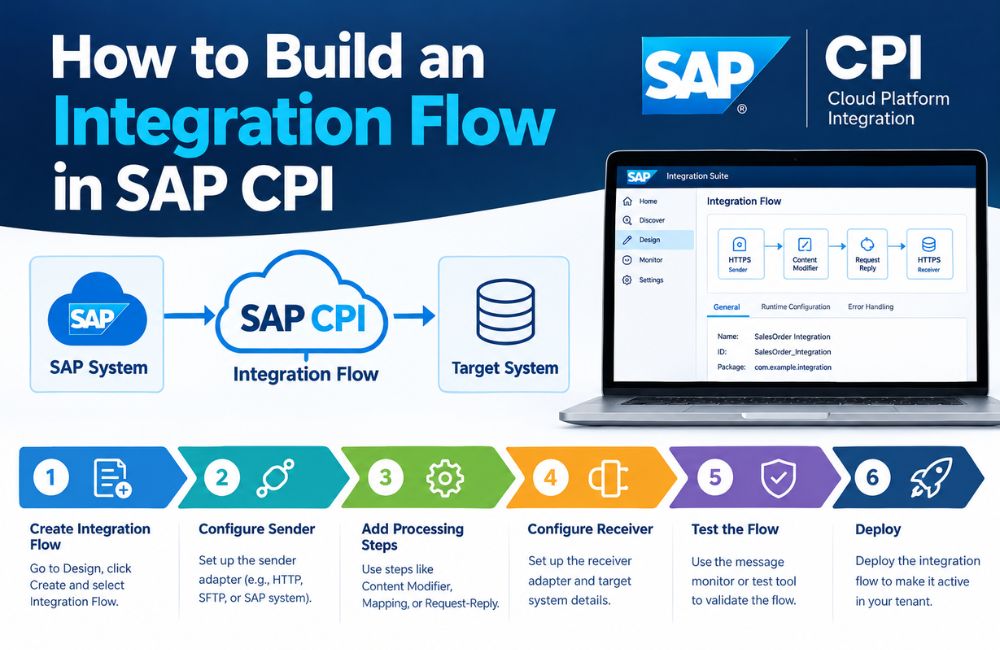
  • How to Build an Integration Flow in SAP CPI

    How to Build an Integration Flow in SAP CPI

    SAP CPI Integration is used to connect SAP applications, third-party platforms, APIs, databases, file servers, and other business systems. SAP CPI is the commonly used name for SAP Cloud Platform Integration. In current SAP terminology, Cloud Integration is a capability within SAP Integration Suite on SAP Business Technology Platform (SAP BTP).

    An integration flow, commonly called an iFlow, defines how a message moves from a sender to a receiver. It can control connectivity, message transformation, mapping, routing, validation, and other processing steps. SAP provides a graphical editor where integration developers can model these steps.

    For beginners, building an iFlow involves several important stages. You need to understand the source and target systems, select the correct adapters, configure the message-processing steps, test the flow, and deploy it to the Cloud Integration tenant.

    This guide explains how to build an integration flow in SAP CPI in a clear, practical, and search-friendly format. It also covers AEO and GEO considerations for technical content.

    What Is an Integration Flow in SAP CPI?

    An integration flow is a visual model that defines how a message is processed inside SAP Cloud Integration.

    An integration flow normally contains a sender, a receiver, communication adapters, and one or more message-processing steps. SAP describes these as the main elements used to define how messages are processed on the tenant.

    A basic architecture can look like this:

    Sender → Adapter → Integration Process → Processing Steps → Adapter → Receiver

    For example:

    E-commerce System → HTTPS → SAP CPI → Message Mapping → S/4HANA

    The e-commerce system sends the message. SAP Cloud Integration receives it through the configured adapter. The message is then transformed or processed before it reaches SAP S/4HANA.

    The exact flow depends on the business requirement and the technologies used by the connected systems.

    What You Need Before Building an SAP CPI Integration Flow

    Before creating an iFlow, identify the source and target systems.

    You should know which application will send the message and which application will receive it. You should also identify the communication protocol, authentication method, message format, required fields, and expected response.

    For example, consider an integration between an external application and SAP S/4HANA.

    The source might provide JSON through a REST API, while the SAP system may require a different structure. In this situation, the integration flow needs an appropriate sender adapter, message-processing logic, mapping, and receiver configuration.

    You also need access to an SAP Cloud Integration environment and an integration package. SAP’s current documentation requires an integration package before creating an integration flow.

    Step 1: Create an Integration Package

    The first step is to create or select an integration package.

    An integration package provides a container for related integration artifacts. These artifacts can include integration flows and other integration resources.

    In the SAP Cloud Integration design environment, you can select an integration package and open it for editing. You can then add an integration flow from the Artifacts section. SAP documents this as the standard process for manually creating a new integration flow.

    A meaningful package name can help identify the business process or application area.

    For example:

    Customer Integration

    Order Management Integration

    S/4HANA CRM Integration

    The naming structure should match the organization’s integration governance rules.

    Step 2: Create the Integration Flow

    After opening the integration package, navigate to the Artifacts tab and select Add Integration Flow.

    Choose the option to create a new integration flow.

    You can provide a name and description for the flow. SAP automatically generates an ID from the name by default, although the ID can be edited manually. The integration flow ID must be unique across the tenant.

    For example:

    Name: Customer Order Integration

    ID: Customer_Order_Integration

    A clear description should explain the purpose of the integration.

    For example:

    “Transfers customer order data from the external commerce platform to SAP S/4HANA.”

    Clear naming makes integration content easier to manage when a tenant contains many flows.

    Step 3: Define the Sender System

    The sender represents the system that initiates or provides the message.

    The sender can be an SAP application, third-party application, API, file server, or another supported system.

    SAP Cloud Integration supports different types of remote systems and communication protocols. Examples include on-premise SAP systems, SFTP servers, cloud applications, SOAP clients, and other systems.

    For example:

    Sender: E-commerce Platform

    The sender connection determines how the message reaches the integration flow.

    If the external application sends data through HTTPS, an HTTPS-based sender adapter may be appropriate.

    Step 4: Configure the Sender Adapter

    The adapter defines the technical communication channel between the sender and Cloud Integration.

    SAP explains that adapters specify the technical protocols used to connect senders and receivers to the integration platform.

    Common integration technologies include:

    HTTPS for secure web-based communication.

    SOAP for SOAP web services.

    SFTP for secure file exchange.

    OData for OData-based services.

    IDoc for SAP document-based integration.

    The appropriate adapter depends on the source system and its interface.

    For example, if an application sends an HTTP request to a Cloud Integration endpoint, an HTTPS sender adapter can be configured to receive that request.

    Step 5: Add the Integration Process

    The Integration Process is the central area where you add message-processing steps.

    SAP’s graphical editor allows developers to drag and drop processing components into the integration flow. These steps determine what happens to the message after it enters the platform.

    Depending on the scenario, the flow may contain steps such as message mapping, content modification, routing, filtering, request-reply processing, or other supported components.

    A simple integration may require only one or two processing steps.

    A complex enterprise integration can contain many processing stages.

    The design should reflect the actual business and technical requirements.

    Step 6: Add Message Mapping When Required

    Different applications often use different message structures.

    For example, an external system may send:

    customerId

    customerName

    orderAmount

    while the SAP target expects:

    CustomerNumber

    CustomerName

    TotalAmount

    A Message Mapping step can establish the relationship between source and target fields.

    SAP provides a graphical mapping editor. Developers can add source and target message structures and connect the relevant fields. Mapping can also use functions for required transformations.

    SAP documentation identifies supported mapping source and target definitions such as XSD, OData metadata, WSDL, and supported OpenAPI specification files.

    A simplified mapping can look like:

    customerId → CustomerNumber

    customerName → CustomerName

    orderAmount → TotalAmount

    The actual mapping depends on the schemas of the source and target systems.

    Step 7: Add Transformation and Content Processing

    Message mapping is not the only processing option.

    An integration flow may need to modify message content, create properties, change headers, filter information, or prepare a message for another processing step.

    For example, a source application may send an order with 20 fields while the target system requires only 8 fields.

    The integration flow can process the message and provide only the information required by the target.

    Cloud Integration supports different message-processing steps for these types of requirements. SAP describes integration flow steps as the components used to define what happens to a message during processing.

    Step 8: Configure Message Routing

    Some integration scenarios require conditional routing.

    For example, an organization may process orders differently depending on the customer’s country.

    The flow could use a routing condition such as:

    Country = Germany → European Processing System

    Country = USA → North American Processing System

    A router can evaluate message information and send the message through the appropriate path.

    This becomes useful when a single source system communicates with multiple target systems.

    Routing is one of the integration patterns supported by Cloud Integration.

    Step 9: Define the Receiver System

    The receiver is the system that receives the processed message.

    The receiver could be:

    SAP S/4HANA

    SAP SuccessFactors

    A CRM platform

    A REST API

    An SFTP server

    A database

    The receiver adapter determines how Cloud Integration communicates with the destination.

    For example:

    SAP CPI → HTTPS → REST API

    or:

    SAP CPI → SFTP → File Server

    The correct receiver adapter depends on the target interface and protocol.

    Step 10: Configure the Receiver Adapter

    The receiver adapter contains the technical configuration needed to communicate with the target.

    The configuration can include details such as the endpoint address, authentication method, connection settings, and other adapter-specific parameters.

    For example, an HTTPS receiver may require an API endpoint and authentication configuration.

    An SFTP receiver may require a server address, port, user authentication, and directory information.

    Security configuration should be handled using the appropriate Cloud Integration security mechanisms rather than placing sensitive credentials directly into message content.

    SAP documents security artifacts such as digital keys and keystores as part of the security configuration for secure communication.

    Step 11: Configure Authentication and Security

    Security should be considered before the integration flow is deployed.

    The authentication method depends on the connected application and adapter.

    An API may use credentials, OAuth-based authentication, certificates, or another supported method. An SFTP connection may use SSH-related authentication mechanisms.

    HTTPS can protect communication between systems when correctly configured.

    SAP explains that communication protocols such as HTTP/S and SSH have security options that can protect message exchange.

    Security configuration should also consider authorization, certificate management, credential storage, and organizational security policies.

    Step 12: Validate the Integration Flow

    Before deployment, review the integration flow configuration.

    Check the sender and receiver connections. Confirm that the selected adapters match the required protocols. Review mapping fields and routing conditions.

    The message structure should also be checked against the requirements of the target application.

    For mapping scenarios, verify that required source fields are connected to the correct target fields.

    SAP’s mapping editor provides source and target structures that developers can use to establish field relationships.

    Validation at this stage can reduce configuration problems during testing.

    Step 13: Test the Integration Flow

    Testing confirms whether the flow processes messages as expected.

    A test message should represent a realistic business transaction.

    For example, if the integration processes sales orders, the test message should contain the required order fields and valid values.

    Testing should check the complete process:

    Message Received → Processing → Mapping → Routing → Target Delivery

    The target application should be checked to confirm that the message was received and processed correctly.

    Different test cases can also be used for valid data, missing fields, incorrect values, authentication errors, and unavailable endpoints.

    Step 14: Deploy the Integration Flow

    An integration flow must be deployed before it can run on the Cloud Integration tenant.

    SAP documentation states that integration flows defined during design time need to be deployed to activate them on the associated tenant.

    After deployment, the flow becomes available for runtime processing according to its configuration.

    Deployment should occur after the flow has been reviewed and tested.

    Production deployment should also consider security, monitoring, error handling, and operational requirements.

    Step 15: Monitor the Integration Flow

    Monitoring helps determine whether messages are processed successfully.

    After deployment, integration administrators can use Cloud Integration monitoring capabilities to examine message processing and integration content.

    If a message fails, monitoring information can help identify the affected flow and investigate the processing stage.

    For example, an error may occur because of:

    Invalid authentication

    Incorrect mapping

    Unavailable target system

    Invalid message structure

    Missing required data

    Monitoring should be part of the integration lifecycle rather than an activity performed only after an error occurs.

    SAP CPI Integration Naming Conventions

    Clear naming is useful when a tenant contains many integration flows, channels, mappings, and related artifacts.

    SAP provides naming conventions for integration resources. For example, channel names can include the protocol, direction, and operation definition. SAP gives examples such as HTTP_RCV_PurchaseOrderCreate.

    Mapping names can also describe the source message, target message, and format.

    For example:

    MM_PurchaseOrderERPXML_to_PurchaseOrderC4CJSON

    Clear names make it easier for developers and administrators to understand the purpose of an integration artifact.

    SAP CPI Integration Error Handling

    A production integration flow should account for expected errors.

    For example, a temporary network problem can prevent a message from reaching a receiver. An invalid business record can also cause a target system to reject a message.

    These two situations can require different handling.

    Error-handling logic can include exception processing, message logging, controlled retry mechanisms, and monitoring.

    SAP’s enterprise integration design guidance emphasizes resilience, resource management, loose coupling, and graceful failure handling when designing integration flows.

    The appropriate error-handling strategy depends on the business process and technical architecture.

    SAP CPI Integration Example

    Consider a simple order integration between an online store and SAP S/4HANA.

    The online store sends an order through an HTTPS request.

    The integration flow receives the order using an HTTPS sender adapter.

    The message is then processed. If the external application uses a different structure from S/4HANA, a Message Mapping step transforms the data.

    A routing step can determine whether additional processing is required.

    The final message is then sent to SAP S/4HANA through the configured receiver connection.

    The complete architecture can be represented as:

    Online Store → HTTPS Sender → SAP CPI → Message Mapping → Router → S/4HANA Receiver

    This is a simplified example. A real implementation may include authentication, validation, error handling, logging, enrichment, and additional processing.

    SAP CPI Integration and AEO

    Answer Engine Optimization (AEO) focuses on making content easy for search engines and answer systems to understand and use when responding to questions.

    For this topic, important questions include:

    How do you create an integration flow in SAP CPI?

    What is an iFlow in SAP CPI?

    How do you configure a sender adapter?

    How do you add message mapping?

    How do you deploy an SAP CPI integration flow?

    Each question should have a direct answer before the detailed explanation.

    Clear H2 headings, concise definitions, logical steps, and technically accurate terminology can make the content easier for answer engines to process.

    For example, the direct answer to “What is an iFlow?” should appear at the beginning of the relevant section.

    SAP CPI Integration and GEO

    Generative Engine Optimization (GEO) focuses on creating content that can be accurately interpreted by AI-powered search and generative systems.

    For SAP technical content, GEO can be supported by using clear relationships between important entities.

    Relevant entities for this topic include SAP Cloud Integration, SAP Integration Suite, SAP Business Technology Platform, integration flow, iFlow, SAP S/4HANA, adapters, Message Mapping, REST API, HTTPS, SOAP, OData, SFTP, and IDoc.

    The relationships between these entities should be explained clearly.

    For example:

    SAP BTP → SAP Integration Suite → Cloud Integration → Integration Flow → Sender → Processing → Receiver

    Using the current SAP product terminology is also important. “SAP CPI” remains a widely searched term, while current SAP documentation refers to Cloud Integration within SAP Integration Suite.

    This approach provides context for both users who search using the familiar SAP CPI term and readers who use SAP’s current terminology.

    SAP CPI Integration Best Practices

    Integration flow design should begin with a clear understanding of the business process.

    The source and target systems should be identified before development. The required data fields, communication protocol, authentication method, message format, and expected processing behavior should also be defined.

    Keep the integration flow understandable. Processing steps should have clear purposes.

    Use meaningful names for flows, channels, mappings, and other artifacts. SAP provides naming guidance for these resources.

    Security credentials should be managed through appropriate security mechanisms.

    Testing should include valid and invalid messages. Error handling and monitoring should be considered before production deployment.

    Frequently Asked Questions About Building an SAP CPI Integration Flow

    What is an integration flow in SAP CPI?

    An integration flow is a graphical model that defines how a message is received, processed, transformed, routed, and delivered to a receiver. SAP Cloud Integration provides a graphical editor for designing these flows.

    How do I create an SAP CPI integration flow?

    First, create or open an integration package. Then add an integration flow, provide its name and ID, define the sender and receiver, configure adapters, add processing steps, test the flow, and deploy it. SAP documents these steps in its Cloud Integration development guide.

    What is an iFlow?

    An iFlow is a commonly used term for an integration flow. It defines the sequence of processing actions used to handle messages between connected systems.

    What is an adapter in SAP CPI?

    An adapter provides the technical communication channel between Cloud Integration and a sender or receiver. The adapter determines the protocol and connection method used for the integration.

    Why is Message Mapping used in SAP CPI?

    Message Mapping is used to associate fields between source and target message structures. It can also use mapping functions to perform required transformations.

    Can SAP CPI connect SAP S/4HANA with third-party systems?

    Yes. Cloud Integration supports connections between SAP and non-SAP applications. The specific connection depends on the application, adapter, protocol, authentication method, and integration requirements.

    Does an integration flow need to be deployed?

    Yes. An integration flow created during design time must be deployed to the associated tenant before it becomes active for runtime processing.

    How do I monitor an SAP CPI integration flow?

    After deployment, Cloud Integration monitoring capabilities can be used to examine integration content and message processing. Monitoring information can help identify processing failures and configuration problems.

    Can SAP CPI transform XML and JSON?

    Cloud Integration provides message-processing and mapping capabilities for different message structures and formats. The exact transformation method depends on the source and target message definitions.

    Conclusion

    Building an SAP CPI Integration flow involves designing a controlled path for messages between a sender and receiver.

    The main stages include creating an integration package, creating an iFlow, defining sender and receiver systems, configuring adapters, adding processing steps, mapping data when required, configuring security, testing the flow, deploying it, and monitoring runtime processing.

    An integration flow can be simple or complex depending on the business process. A basic flow may connect one sender directly to one receiver. More advanced flows can include multiple receivers, mappings, routing conditions, APIs, transformations, error handling, and additional processing.

    SAP CPI Integration is currently associated with Cloud Integration, a capability within SAP Integration Suite on SAP Business Technology Platform. SAP provides official development guidance for integration flows, adapters, mapping, deployment, monitoring, and integration design.

  • Gig Economy Payouts: Issuing Virtual Cards to Contractors On Demand

    Gig Economy Payouts: Issuing Virtual Cards to Contractors On Demand

    Gig platforms are under pressure to pay contractors faster, with fewer errors and lower administrative cost. Virtual cards offer an on-demand payout method that can move funds quickly, support spending controls, and reduce dependence on slower channels such as checks or standard ACH. For contractors, that can mean faster access to earnings and more predictable cash flow. The real advantage, however, depends on where this model works best and where it falls short.

    What Virtual Card Payouts Are for Contractors

    For contractors in the gig economy, virtual card payouts are digital payment credentials issued for receiving earnings without a physical card. They function through card networks and can be provisioned for online transactions, mobile wallets, or controlled spending environments.

    Unlike traditional payroll instruments, they are typically created, managed, and monitored through a platform interface.

    For hiring platforms and independent workers, this model supports streamlined disbursement administration and standardized payment handling.

    Common virtual card benefits include reduced reliance on paper checks, easier credential replacement, and configurable usage controls. These features can align with contractor flexibility by allowing earnings access through digital channels that fit varied work patterns.

    In practice, virtual card payouts represent a payment method designed for contingent labor arrangements, platform-based engagement, and modern contractor account preferences across diverse service categories.

    Why Faster Contractor Payouts Matter

    Faster contractor payouts support cash flow stability by reducing the time between completed work and available funds.

    They also influence retention, as reliable and timely payment affects contractor satisfaction and long-term platform participation.

    In addition, payout speed can improve availability by making it easier for platforms to attract contractors for immediate or recurring work.

    Cash Flow Stability

    Although payout speed may appear operational, it directly affects contractors’ cash flow stability by reducing the time between completed work and available funds.

    Shorter settlement cycles improve cash flow management by enabling workers to cover routine expenses, service obligations, and manage income gaps without relying on credit or delaying payments. Faster access to earnings also supports financial predictability, especially for contractors whose workloads fluctuate daily or seasonally.

    When payments arrive promptly, budgeting becomes more accurate because income timing more closely matches labor performed. This reduces uncertainty around bill payment dates, fuel purchases, maintenance costs, and other recurring business expenses.

    In contrast, delayed disbursements can create avoidable liquidity pressure, forcing contractors to absorb timing mismatches between earned revenue and immediate obligations.

    On demand payouts therefore function as a practical tool for stabilizing variable income patterns.

    Retention And Availability

    When contractors can access earnings soon after completing work, platforms are better positioned to retain active participants and maintain labor availability during peak demand.

    Faster payouts reduce uncertainty, strengthen trust, and improve willingness to accept additional shifts or assignments. As a result, retention often improves without relying solely on incentive spending or repeated recruitment.

    • Immediate access to funds can increase scheduling flexibility and short-notice acceptance.
    • Reliable payment experiences support contractor engagement strategies across varied market conditions.
    • Data from payout satisfaction surveys can identify friction points affecting retention and responsiveness.

    For marketplaces balancing supply and demand, payout speed functions as an operational lever.

    It can lower dropout risk, support consistent coverage, and help preserve service quality when competition for labor intensifies. This creates measurable advantages in continuity, responsiveness, and workforce availability overall.

    Instant Funding at Claim Approval

    Claims payouts are a moment of truth for insurers, and issuing a funded virtual card at the moment of claim approval turns a multi-day disbursement into an instant one. The pattern relies on a virtual card issuing API that can create and fund a card in a single flow, deliver it digitally to the claimant, and restrict spending to approved categories where the policy requires it.

    How Virtual Cards Speed Up Contractor Payouts

    Virtual cards can accelerate contractor payouts by providing near-instant access to funds after payment is issued.

    Compared with standard bank transfers, they typically reduce settlement delays and enable faster use of earnings.

    Their on-demand issuance also allows platforms to distribute payment credentials quickly without relying on physical card delivery.

    Instant Access To Funds

    Many gig platforms now use virtual cards to give contractors near-immediate access to earnings, reducing the delay associated with bank transfers, mailed checks, or batch payroll cycles. This model supports instant funding after completed tasks, improving cash availability for fuel, supplies, or daily expenses.

    Because credentials are issued digitally, workers can begin spending promptly through online wallets or card-enabled purchases. Platforms also benefit from seamless transactions that align payout timing with work completion, strengthening operational responsiveness and contractor satisfaction.

    • Immediate card issuance reduces waiting periods after approved jobs.
    • Digital delivery supports online purchases, wallet use, and controlled spending.
    • Real-time availability improves budgeting flexibility for independent workers.

    Instant access to funds can enhance retention by meeting contractor expectations for speed, convenience, and predictable payment access.

    It also supports stronger trust between platforms and workers overall.

    Faster Than Bank Transfers

    Compared with standard bank transfers, virtual card payouts shorten the time between job approval and usable funds by bypassing ACH processing windows, banking cutoffs, and settlement delays. Funds can be applied immediately through virtual wallets and accepted across broad digital payments networks, improving contractor flexibility without requiring traditional deposit timing.

    This acceleration supports transactional efficiency by reducing waiting periods that disrupt cash flow and routine purchasing. It also strengthens financial management through faster reconciliation, clearer expense tracking, and better visibility into payout activity.

    For platforms, technology integration with card programs can streamline disbursement operations while improving user experience. Virtual cards may also enhance payment security through controlled credentials and spend parameters. The result is quicker access to working capital, fewer administrative bottlenecks, and potential cost savings versus exception handling or failed transfer remediation efforts.

    On-Demand Card Issuance

    Enablement begins at issuance: on-demand card provisioning allows a platform to generate payment credentials for a contractor as soon as work is approved, without waiting for physical card production or manual account setup.

    This model improves payout speed, supports on-demand flexibility, and reduces administrative delays across dispersed contractor networks. Virtual credentials can be delivered instantly through secure apps, email, or digital wallet integration, enabling immediate use for online purchases, bill payments, or mobile wallet transactions.

    • Immediate issuance shortens the time between job completion and fund access.
    • Tokenized delivery methods strengthen security while minimizing operational friction.
    • Programmable controls help platforms define spend limits, duration, and merchant use.

    For gig platforms, on-demand card issuance creates a responsive payout infrastructure that aligns payment timing with real-time labor activity and contractor expectations.

    When Virtual Cards Beat ACH for Payouts

    Although ACH remains a standard payout rail, virtual cards can be superior when speed, control, and immediate spendability matter more than direct deposit. Key virtual card advantages include instant issuance, granular spending limits, and simpler reconciliation, all of which support operational efficiency and stronger financial management.

    These attributes align with contractor preferences for faster access to funds and greater payout flexibility.

    From a risk perspective, transaction security improves through tokenization, merchant controls, and easy deactivation. In addition, payment technology continues to reflect digital payment trends favoring real-time, mobile-first experiences.

    For platforms evaluating user experience, virtual cards can reduce waiting periods and administrative friction while preserving oversight. Such gig economy insights indicate that, in certain payout environments, cards offer a more responsive alternative to ACH for both platforms and workers alike.

    Best Gig Payout Use Cases for Virtual Cards

    Virtual cards are especially effective in gig payout scenarios that require immediate access to funds and controlled spending.

    Common examples include instant shift earnings for on-demand workers, driver fuel spending, and project-based contractor payments.

    These use cases highlight how speed, flexibility, and payment oversight can align with the operational needs of gig platforms.

    Instant Shift Earnings

    Many gig workers prioritize immediate access to earnings after completing a shift, especially in sectors such as delivery, hospitality, event staffing, and temporary labor. Virtual cards support instant shift earnings by enabling companies to disburse funds as soon as work is verified. This approach reduces reliance on weekly payroll cycles and improves worker satisfaction through instant payment solutions and flexible earning options.

    • Faster access to completed-shift earnings without bank transfer delays
    • Lower administrative overhead through automated payout triggers
    • Better contractor retention during high-volume staffing periods

    For platforms, virtual cards create a controlled, traceable payout method that aligns with on-demand labor models.

    For contractors, immediate availability of earned funds can improve budgeting, meet urgent expenses, and strengthen trust in the platform’s payment experience.

    Driver Fuel Spending

    For ride-share, delivery, and courier workers, fuel is one of the most frequent and unpredictable operating expenses. Virtual cards can address this need by funding approved fuel purchases in real time, reducing out-of-pocket spending and minimizing reimbursement delays.

    Platforms can assign merchant controls, spending caps, and geographic limits to support compliance and limit misuse. This approach also improves expense visibility for operators managing dispersed contractor networks.

    Transaction data can be reviewed against route activity, helping identify irregular spending patterns and informing fuel efficiency strategies. In addition, virtual cards can simplify contractor reimbursement policies by replacing manual claims with controlled, auditable disbursements tied to active work.

    For contractors, timely access to fuel funds supports operational continuity, especially during periods of volatile prices or unusually high trip volume.

    Project-Based Contractor Payments

    Some gig platforms rely on project-based contractors for discrete assignments such as design work, home services, field inspections, or short-term technical support. Virtual cards support milestone-based payouts while preserving transaction security and payment flexibility across varied workflows.

    They also align with contractor preferences for faster access to approved funds and improved user experience through mobile access.

    • Supports freelancer incentives tied to completion, quality, or response times.
    • Enables expense tracking, budgeting tools, and stronger financial literacy for independent workers.
    • Offers integration options with project systems, payroll platforms, and compliance controls.

    For platforms, virtual cards simplify disbursement timing, reduce reimbursement friction, and create clearer audit trails.

    For contractors, they provide immediate usability for supplies or travel, while limiting misuse. This structure suits short engagements where speed, oversight, and predictable settlement are operational priorities for both parties.

    Which Contractors Benefit Most From Virtual Cards?

    Among gig workers, virtual cards tend to benefit contractors who need immediate access to earnings, make frequent online purchases, or separate business spending from personal finances. This includes delivery drivers buying fuel, freelance creatives paying software subscriptions, and field service contractors covering materials between jobs.

    For these groups, contractor flexibility improves because funds can be allocated quickly to operational needs without waiting for traditional banking cycles.

    Virtual cards also serve contractors who value expense management and payment transparency. Dedicated card credentials simplify recordkeeping, support cleaner reconciliation, and reduce ambiguity around reimbursable purchases.

    In addition, contractors working primarily through digital platforms may prefer virtual cards for digital security, since temporary or merchant-specific card details can limit exposure to fraud. As a result, adoption is strongest where speed, control, and traceability matter most.

    How Instant Contractor Payouts Actually Work

    Instant contractor payouts build on those same priorities of speed, control, and traceability by moving approved earnings through digital payment rails as soon as a platform authorizes disbursement.

    Payment technology connects platform ledgers, issuer processors, and digital wallets, enabling instant payouts without traditional payroll delays. Funds are assigned to a virtual card or wallet token, supporting contractor flexibility and contractor independence while preserving virtual card security through controls, authentication, and monitoring.

    This payment innovation improves gig worker satisfaction by reducing cash-flow gaps and simplifying financial management.

    • Platform approval triggers automated funding and settlement messages.
    • Security rules support expense tracking, limits, and audit visibility.
    • Wallet availability and alerts strengthen access, transparency, and trust.

    The result is a faster, more accountable payout process aligned with modern contractor operations and preferences today.

    What Contractors Can Pay With Virtual Cards

    Most contractor purchases that support day-to-day work can be funded with virtual cards, provided the platform permits the merchant category and transaction type. Eligible uses often include fuel, public transit, parking, tolls, lodging, meals during assignments, and mobile phone top-ups tied to service delivery.

    Contractors may also pay for software subscriptions, cloud tools, online advertising, office supplies, protective gear, and small equipment needed to complete jobs.

    In many gig models, virtual cards can cover approved contractor expenses linked to travel, communications, fulfillment, and digital operations. They may also be used for internet services, printing, shipping, and replacement materials purchased online or in stores.

    Among the main virtual card benefits are faster access to working funds, reduced reimbursement delays, and clearer transaction records for platforms and contractors alike.

    How to Set Virtual Card Spending Rules

    To set effective virtual card spending rules, platforms typically define limits by amount, merchant category, time period, and approved use case. These controls align contractor payments with spending limits, transaction categories, and merchant restrictions while supporting budget management.

    Administrators also assign user permissions, set card expiration dates, and apply compliance checks before activation. Clear parameters help standardize approved purchases and simplify oversight.

    • Configure single-use or recurring cards by task, project, or payout cycle.
    • Enable usage tracking to compare authorized spend against actual card activity.
    • Use reporting features to review exceptions, validate policy adherence, and refine controls.

    Well-structured rules improve operational consistency and strengthen fraud prevention efforts without limiting legitimate contractor flexibility.

    Regular policy reviews ensure spending rules remain practical, measurable, and aligned with program objectives and changing business requirements over time.

    How Virtual Cards Reduce Payout Fraud

    Beyond spending controls, virtual cards reduce payout fraud by limiting how and where funds can be used. Single-use or merchant-specific credentials narrow exposure, while Spend limits cap losses if card details are intercepted.

    Identity verification at onboarding helps block false contractor accounts before disbursement occurs.

    Fraud detection improves when issuers combine Transaction monitoring, Behavioral analysis, and Risk assessment to flag unusual locations, velocities, or purchase types. Strong Security protocols, including tokenization and Data encryption, protect card credentials during issuance and use.

    Compliance tracking supports internal oversight by documenting approvals, changes, and exceptions without expanding into broader regulatory issues. User education further reduces risk by teaching contractors to recognize phishing, protect devices, and report anomalies quickly.

    Together, these controls create a tighter, more auditable payout environment overall.

    Contractor Payout Compliance Rules

    Contractor payout compliance rules are shaped by worker classification requirements and cross-border payout obligations.

    Accurate classification determines tax treatment, reporting duties, and benefit exposure, while international payments introduce jurisdiction-specific rules on withholding, documentation, and money movement.

    These requirements establish the regulatory framework that platforms must address when paying independent contractors.

    Worker Classification Requirements

    Clear worker classification rules underpin compliant gig economy payouts, because payment processes, tax withholding, reporting obligations, and benefit eligibility all depend on whether a worker is treated as an independent contractor or an employee.

    Accurate worker classification determines employment status, payment classification, tax implications, and legal compliance under applicable labor regulations. Misclassification can affect gig worker rights, contractor benefits, platform liability, and contractor responsibilities tied to invoicing, recordkeeping, and disclosures.

    • Platforms should document classification criteria and review them regularly.
    • Contracts should align operational control, payment terms, and stated independent contractor status.
    • Audit trails should support reporting accuracy and dispute resolution.

    For virtual card payouts, classification reviews should occur before issuance, ensuring disbursement methods match status-based obligations.

    Consistent governance reduces enforcement risk and supports defensible payout practices.

    Cross-Border Payout Rules

    When gig platforms pay contractors across borders, compliance requirements expand to include jurisdiction-specific tax documentation, anti-money-laundering controls, sanctions screening, currency conversion rules, and local payment regulations.

    Platforms must verify contractor identity, beneficial ownership where applicable, and tax status before issuing virtual cards or initiating transfers. They also need procedures for monitoring transaction thresholds, suspicious activity, and restricted-country exposure under cross border regulations.

    Operational controls should address foreign exchange disclosures, fee transparency, and record retention.

    Because currency conversion can affect net pay, platforms should present exchange rates and settlement timing clearly to contractors. Local rules may also govern e-money issuance, prepaid card usage, data privacy, and reporting obligations.

    A scalable payout program therefore depends on coordinated legal review, processor oversight, and periodic compliance audits across every active corridor globally.

    How to Fix Failed Virtual Card Payouts

    Why do virtual card payouts fail despite successful initiation? Common errors often arise after authorization, during payment processing, or within system integration between issuer, platform, and wallet.

    Failed transactions may result from expired credentials, mismatched contractor data, fraud filters, funding limits, or network latency. Resolution requires structured troubleshooting tips, clear communication channels, and timely technical support.

    • Verify contractor profile data, card status, balance availability, and merchant acceptance rules before reissuing payments.
    • Review processor logs, decline codes, and API responses to isolate system integration faults and recurring payment processing exceptions.
    • Collect contractor feedback, document common errors, and apply best practices to improve user experience and reduce repeat failures.

    Consistent monitoring, standardized retries, and escalation protocols help platforms correct issues quickly while preserving operational reliability and auditability across payout workflows.

    How Virtual Cards Improve Contractor Cash Flow

    Many contractors experience cash flow strain when payout cycles are slow or unpredictable, and virtual cards can reduce that pressure by accelerating access to approved funds.

    Faster disbursement helps independent workers cover fuel, supplies, subscriptions, and other operating costs without waiting days for bank transfers to settle. This immediacy supports steadier cash flow management across irregular work patterns and variable income streams.

    Virtual card benefits also include tighter spending control and clearer transaction visibility. Contractors can use funds promptly for business expenses, while platforms can issue payments per shift, task, or milestone.

    That flexibility reduces reliance on personal credit, lowers the risk of missed bill payments, and improves budgeting accuracy. As a result, virtual cards can strengthen short term liquidity and help contractors maintain more predictable financial operations between engagements and client payments.

    What to Look for in a Virtual Card Provider

    Selecting a virtual card provider requires more than fast disbursement, since payout speed has limited value without reliability, control, and broad usability. Decision makers should compare provider reputation, virtual card security, and compliance features before evaluating convenience.

    Strong integration capabilities reduce administrative friction, while clear fee structures prevent avoidable payout costs. A practical user experience matters for both administrators and contractors.

    • Customer support should be responsive across onboarding, exceptions, and dispute handling.
    • Transaction limits and spending flexibility should match contractor use cases without weakening controls.
    • Technological innovation should support tokenization, real-time issuance, and adaptable program management.

    Providers should also demonstrate stable processing performance, transparent reporting, and consistent acceptance across merchant networks.

    The strongest options balance governance, usability, and scalability, rather than emphasizing speed alone or promotional incentives.

    How to Measure Virtual Card Payout Success

    Effective measurement of virtual card payout success depends on evaluating operational performance, contractor adoption, and financial control in combination rather than isolation.

    Core success metrics include payout reliability, settlement speed, error rates, and administrative workload reduction. Relevant performance indicators should be monitored through transaction tracking systems that capture failures, reversals, funding delays, and usage patterns.

    Adoption rates reveal whether contractors prefer virtual cards over legacy methods, while contractor satisfaction is best assessed through structured user feedback on access, convenience, and trust.

    Financial analysis should compare processing costs, fraud exposure, reconciliation accuracy, and cash flow timing. Comparative studies across regions, contractor segments, or payout methods can identify meaningful differences in operational efficiency.

    Together, these measures provide a balanced framework for judging program effectiveness and scalability over time.

    Frequently Asked Questions

    Can Contractors Add Virtual Cards to Apple Pay or Google Wallet?

    Yes, contractors can often add eligible virtual cards to Apple Pay or Google Wallet, depending on issuer support and device compatibility. This supports contractor convenience while maintaining virtual card security through tokenization, authentication, and controlled card provisioning.

    Do Virtual Card Payouts Affect Contractors’ Credit Scores?

    No—ironically, receiving funds looks financially dramatic yet usually leaves credit scores untouched; unless the virtual card functions as credit, neither credit utilization nor payment history is typically reported to bureaus, so contractors see no direct score impact.

    Can International Contractors Receive Virtual Card Payouts in Local Currencies?

    Yes, international contractors can often receive virtual card payouts in local currencies, depending on provider capabilities, regional regulations, and payment processing networks. Availability may involve currency conversion fees, settlement timing differences, and merchant acceptance limitations locally.

    What Customer Support Do Contractors Get if a Virtual Card Is Declined?

    Contractors typically receive assistance through multiple support channels, including in-app chat, email, and phone. For declined transactions, support teams usually verify card status, merchant acceptance, funding availability, and security restrictions, then guide resolution or reissue.

    Are There Tax Reporting Differences Between Virtual Card Payouts and Direct Deposit?

    Generally, no; tax implications and reporting requirements usually remain the same for virtual card payouts and direct deposit. Method differs, obligation does not; classification, income reporting, and applicable forms typically depend on contractor status.

    Final words

    Virtual card payouts offer gig platforms a practical way to modernize contractor compensation with speed, control, and flexibility. By reducing payment delays, improving cash flow access, and limiting common disbursement failures, they strengthen contractor trust and operational consistency. When matched with the right provider and clear performance metrics, virtual cards can turn payouts into a strategic advantage. In a labor market that moves quickly, timely payments function as the bridge between completed work and sustained workforce loyalty.


  • Virtual Cards for Crypto Traders: What Users in France Should Know

    Virtual Cards for Crypto Traders: What Users in France Should Know

    You should consider virtual cards to fund crypto trades in France when you want faster deposits, tighter spending controls, and less exposure of your main bank details. They use tokenized or single‑use numbers, link like a debit card, and let you revoke or limit spend instantly. Expect KYC, possible merchant or AML blocks, and fees or FX margins depending on provider. Keep your documents handy for verification, and continue to learn about provider differences and risks.

    Quick Answer: Should French Crypto Traders Use Virtual Cards?

    Wondering if virtual cards are right for you as a French crypto trader? You’ll likely find them useful: virtual cards offer crypto benefits like faster payments, reduced exposure of your primary account, and easier expense tracking.

    You can generate single-use numbers to limit fraud and set tight spending controls that match trading rhythms. Still, weigh privacy concerns — some issuers log transactions and share data with partners, and regulatory checks may link cards to your identity.

    If you trade casually, a virtual card adds convenience and basic protection; if you trade professionally or need strong anonymity, it’s only one tool among many. Compare issuers, read privacy policies, and use complementary safeguards like separate accounts and cautious KYC disclosure.

    How Virtual Cards Work With Crypto Exchanges and Brokers

    Link a virtual card to your exchange or broker like a regular debit card, and you’ll handle deposits and payments with a temporary, tokenized number instead of exposing your main account details.

    You’ll use the same verification flow most platforms require, but tokenization and crypto integration keep your real bank info concealed. Expect quick authorization responses and limits set by the card issuer or platform.

    1. Create or import a virtual card in your banking app tied to your account.
    2. Add card details to the exchange/broker during payment setup.
    3. Confirm micro-deposit or 3D Secure challenge for identity verification.
    4. Monitor and revoke the virtual card anytime for instant card security control.

    This approach limits exposure and simplifies funding while preserving operational transparency.

    Locking Down Our Card After One Bad Checkout

    It took exactly one skimmed card on a dodgy site for us to rethink our habits. A security-minded friend told us the simplest defense is paying with a throwaway card on anything you don’t fully trust. He recommended the Qwikvcc reloadable virtual card, and it’s now standard practice for us. If a number ever leaks, deleting it takes a second—our real credit card and bank stay completely out of reach. For a VCC you can stand up in under a minute, the security payoff is enormous.

    Why French Traders Use Virtual Cards: Speed, Privacy, Security

    French traders favor virtual cards because they speed up deposits, keep your bank details private, and give you immediate control if something looks off.

    You’ll notice speed benefits in faster funding and improved transaction efficiency when markets move; that’s crucial for timely trades.

    Privacy advantages mean your actual account number isn’t shared, reducing exposure and aligning with user experiences that value discretion.

    Strong security features like single-use numbers and instant freezes lower fraud risk and let you act fast.

    Market trends show growing adoption as regulatory impacts push transparency while demanding safer payment rails, so you get compliant options.

    Technology integration with wallets and exchanges streamlines flows, letting you focus on strategy rather than payment hassles.

    Which French Banks and Fintechs Offer Virtual Cards (How They Differ)

    When you compare major French banks to fintechs for virtual cards, you’ll notice banks often offer broader services while fintechs focus on speed and flexibility.

    Check fees and monthly or per-transaction limits closely, since they vary a lot and affect trading flows.

    I’ll outline key providers and contrast their pricing and limit structures so you can pick what fits your trading style.

    Major Banks vs Fintechs

    Although major banks and fintechs both issue virtual cards, they serve different needs: banks like BNP Paribas, Société Générale and Crédit Agricole typically offer virtual cards as extensions of full-service accounts with stronger regulatory backing and branch support, while fintechs such as Revolut, N26, and Qonto prioritize speed, flexible limits, instant issuance, and developer-friendly features that appeal to active crypto traders.

    You’ll weigh banking innovations against fintech advantages when choosing. Consider:

    1. Security and compliance: banks lean on legacy compliance frameworks and in-branch verification.
    2. Speed and onboarding: fintechs give near-instant issuance and API access.
    3. Customization: fintechs let you create disposable cards and set merchant categories.
    4. Support model: banks offer in-person help; fintechs rely on chat and online docs.

    Pick the model matching your trading rhythm and trust preferences.

    Fees And Limits

    Because fees and limits shape how you’ll actually use virtual cards, compare pricing tiers and transaction caps across banks and fintechs before committing.

    You’ll see varying fee structures: some incumbents charge monthly maintenance plus per-transaction or cross-border fees, while fintechs often offer subscription tiers that bundle higher allowances and lower per-use costs.

    Check which card networks trigger currency conversion fees for crypto exchanges.

    Transaction limits differ too — daily, monthly, and per-transaction ceilings can restrict large buys or multiple trades; fintechs may raise limits with identity checks or premium plans.

    Also confirm top-up fees, ATM withdrawal charges, and chargeback policies.

    Match the provider’s fee structures and transaction limits to your trading frequency and typical trade size to avoid surprises.

    Payment Limits and Top‑Ups: Single‑Use vs. Reloadable Cards

    You’ll want to compare single‑use limits to understand how much you can spend per transaction without exposing larger balances.

    Check reloadable options and how often you can top up — some cards allow instant reloads while others limit frequency or daily totals.

    Those rules will shape your trading flow and risk management, so pick the model that matches how often and how much you move.

    Single‑Use Limits

    Single‑use virtual cards cap a single transaction or top‑up, so you’ll limit exposure to fraud and accidental overspending while trading.

    You get single use benefits like tighter spending control and clearer risk management without changing your main account. Security features focus on one-off numbers, reducing reuse risk and improving fraud protection for exchanges and services.

    Transaction speed stays fast since issuers generate cards instantly, which improves the overall user experience and convenience factor when you need a quick purchase.

    1. Faster issuance lowers wait times for trades.
    2. One-time numbers prevent repeated charge attempts.
    3. Limits force discipline, aiding budgeted trading.
    4. Minimal account linkage reduces long-term exposure.

    Use single‑use limits when you want targeted, low‑risk payments.

    Reloadable Top‑Up Options

    Reloadable virtual cards let you add funds multiple times, so you can keep a steady payment method for frequent trading without creating new card details each time.

    You’ll find reloadable options usually tied to your primary funding source—bank account, debit card, or e‑wallet—so topping up is straightforward and fast.

    The main user benefits are continuity, fewer interruptions during trading, and the ability to manage a single card’s balance rather than juggling many single‑use cards.

    You can set spending controls and alerts on reloadable cards to monitor trades and avoid overspending.

    Check provider terms for fees and limits per top‑up, and confirm support for crypto merchants and KYC requirements in France to ensure smooth usage.

    Reload Frequency Rules

    Because reload rules affect how often and how much you can fund a card, it’s important to compare limits and top‑up windows between single‑use and reloadable options.

    You’ll want to focus on reload frequency considerations and reload frequency limits to match trading pace and compliance needs. Single‑use cards prevent repeated top‑ups, so they suit one-off purchases and reduce exposure.

    Reloadable cards let you add funds repeatedly but often impose daily, weekly, or monthly caps and mandatory cooldowns.

    1. Check daily and monthly reload frequency limits before choosing.
    2. Note minimum and maximum top‑up amounts per reload.
    3. Confirm cooldown periods between successive reloads.
    4. Verify identity requirements tied to higher reload limits.

    Fees to Expect in France: Issuance, Reloads, FX, Transaction Costs

    When you sign up for a virtual card in France, expect a handful of predictable fees: an issuance charge (often a small one‑time amount), reload or top‑up fees, foreign‑exchange margins on non‑EUR purchases, and per‑transaction or monthly account fees that vary by provider.

    You’ll see issuance costs listed up front; compare providers because some waive them for higher-tier accounts. Reload fees can be fixed or percentage-based, and reload methods (bank transfer, card, or instant rails) affect cost and speed.

    Watch transaction limits — daily and monthly caps can trigger extra fees or declines if you hit them. Foreign exchange spreads typically add 0.5–3% to non‑EUR spending; dynamic currency conversion may add more.

    Check merchant and ATM fees too.

    KYC/AML and Virtual Card Funding for Crypto Accounts

    When you fund crypto accounts with virtual cards, platforms will usually require KYC documents like ID and proof of address to verify your identity.

    You’ll also face AML screening and transaction monitoring designed to catch suspicious patterns or sanctioned entities.

    Understanding those checks helps you choose compliant funding methods and avoid account freezes.

    KYC Requirements Explained

    Although virtual cards make funding crypto accounts quick and convenient, you’ll still face Know Your Customer (KYC) and Anti-Money Laundering (AML) checks that verify your identity, source of funds, and transaction purpose.

    You should know KYC processes will usually include identity verification and documentation requirements tied to local compliance measures. Expect requests for proof of ID, proof of address, and sometimes proof of income or source of funds.

    Platforms in France follow regulator guidance, so turnaround varies.

    1. Provide valid ID (passport or national ID) and a selfie for biometric checks.
    2. Submit recent utility bills or bank statements as address proof.
    3. Disclose payment method details tied to your virtual card.
    4. Cooperate promptly to avoid delays or account limits.

    AML Risks And Controls

    Beyond identity checks, AML risks tied to virtual-card funding deserve close attention because they shape how platforms monitor and restrict activity.

    You’ll face scrutiny when funding crypto accounts with virtual cards because transactions can mask source of funds, enable layering, or link to sanctioned entities.

    AML Compliance frameworks force platforms to log card metadata, transaction patterns, and counterparty details; you should expect transaction limits, holds, or additional documentation requests.

    For Risk Mitigation, platforms use behavioral analytics, velocity checks, and cross‑border screening to detect anomalies.

    You can help by using verified cards in your name, keeping records of legitimate funding sources, and responding quickly to KYC/AML queries.

    That reduces friction and keeps your account in good standing.

    Taxes & Rules in France When Funding Crypto With Virtual Cards

    If you fund crypto with virtual cards in France, you’ll need to navigate specific tax reporting rules and compliance requirements that differ from other payment methods. You must understand tax regulations around gains and the treatment of funding methods for acquisitions, and keep clear records for transaction reporting and legal compliance.

    1. Keep itemized records of card top-ups, exchange deposits, and timestamps to support tax filings.
    2. Report taxable events—disposals, swaps, income—per French rules; funding itself isn’t usually taxable but establishes cost basis.
    3. Ensure exchanges provide compliant statements; reconcile their data with your virtual card records for audits.
    4. Consider seeking a tax adviser familiar with crypto-specific obligations, reporting thresholds, and documentation needed for Trésorerie audits.

    Choosing a Provider: Checklist for Traders (Fees, Limits, AML Risk)

    Record-keeping and tax reporting set the groundwork, but choosing the right virtual card provider determines how smoothly you can fund crypto accounts while controlling costs and compliance risk.

    When you do a provider comparison, check fee transparency first: list issuance, loading, foreign-exchange, and cash-back or refund terms. Confirm monthly and per-transaction limits against your trading size, and ensure top-ups won’t trigger unexpected holds.

    Evaluate AML policies: how and when they freeze funds, KYC depth, and suspicious-activity thresholds. Look for clear dispute and chargeback procedures tied to crypto purchases.

    Verify whether the provider works with exchanges you use and whether their terms explicitly allow crypto spending. Keep a simple scorecard (fees, limits, AML risk, exchange compatibility) to pick the best fit for your trading style.

    How to Set Up a Virtual Card Safely to Fund an Exchange

    Getting a virtual card ready to fund an exchange starts with a secure setup and a clear plan: pick the provider you vetted, complete its KYC, enable strong authentication (preferably hardware or app-based 2FA), and fund the card with only the amount you intend to move so you minimize exposure.

    Next, balance card selection against card features and fees, and confirm exchange compatibility to avoid rejected payments. Follow these steps:

    1. Verify funding methods and limits, preferring instant top-ups to improve transaction speed.
    2. Configure security measures: unique PINs, tokenized numbers, and notification alerts.
    3. Test a small transaction to validate exchange compatibility and user experience.
    4. Monitor activity for fraud prevention and keep records for reconciliation.

    Common Problems: Merchant Blocks, AML Holds, Platform Rules

    Once your virtual card is funded and tested, be aware that merchant blocks, AML holds, and platform rules can still stop a payment or freeze funds.

    You’ll face merchant restrictions when exchanges or processors flag crypto-related activity; that affects card usability and can cause funding difficulties.

    Compliance challenges mean platforms may require extra account verification or pause transactions for review, producing transaction delays.

    Good risk management on your side—keeping documentation, using supported providers, and avoiding rapid high-value transfers—reduces scrutiny.

    Read provider terms to understand platform rules and limits, and track user experiences in forums to spot patterns.

    If a hold happens, respond promptly to verification requests and follow dispute procedures, while preparing alternatives to fund trades.

    Handling Chargebacks, Disputes, and Transaction Reversals

    If you face a disputed charge or reversal, act quickly: contact the merchant and card provider, gather transaction records, and document any communication so you can build a clear timeline.

    You’ll rely on chargeback policies and dispute resolution procedures, balancing transaction verification with fraud prevention to protect funds and user experience.

    1. File promptly with customer support, providing receipts, timestamps, and wallet addresses.
    2. Follow the provider’s dispute resolution steps and keep copies for regulatory compliance.
    3. Use transaction verification tools to prove legitimacy or expose unauthorized use.
    4. Accept potential reversals and learn risk management tactics to avoid repeat issues.

    Stay concise with evidence, respect time limits, and escalate only when necessary to preserve credibility.

    Privacy Tradeoffs: What Providers and Logs Still Reveal

    After you’ve handled disputes and reversals, remember that resolving issues often leaves an audit trail with your card provider and merchants. You should expect logs to record timestamps, merchant IDs, amounts, and sometimes merchant descriptors that tie purchases to crypto platforms.

    Those records create privacy implications even if the virtual card masks your real account number.

    You can reduce exposure by using single-use cards, minimal metadata, and separate billing profiles, but providers still retain transaction histories and may share them with banks or regulators under French law.

    Transaction anonymity isn’t guaranteed: ledger entries, KYC, and IP or device data can re-link activity.

    Review provider policies, request data retention limits, and assume investigators can reconstruct patterns from combined logs.

    Frequently Asked Questions

    Can Virtual Cards Be Used to Withdraw Crypto to Fiat Accounts?

    Yes — you can sometimes use virtual cards to withdraw crypto to fiat accounts, but you’ll depend on platform crypto withdrawal methods and pay virtual card fees; check limits, conversion rates, and issuer restrictions before initiating transfers.

    Do Virtual Cards Affect My Crypto Custodial Insurance Coverage?

    About 60% of exchanges limit coverage: no, virtual cards can change custodial risks and insurance implications — you’ll void or reduce protection if transactions fall outside policy terms, so check your provider’s fine print carefully.

    Can I Use Virtual Cards to Participate in Token Presales or ICOS?

    Yes — you can often use virtual cards to join token presales or ICOs, but you’ll face verification, issuer restrictions, and regional limits; weigh token presale strategies against virtual card benefits like privacy, spending limits, and easier card management.

    Are Virtual Card Payments Eligible for Bank Chargeback Protection in France?

    Sometimes — but chargeback limitations apply in France for virtual card payments, and you’ll face restrictions depending on issuer, merchant type and crypto-related transactions. Know your consumer rights, keep records, and contact your bank promptly if needed.

    Will Using Virtual Cards Trigger Enhanced Due Diligence From My Bank?

    Possibly — banks can flag virtual card use and request identity verification if activity looks risky; you’ll likely face enhanced due diligence when transactions exceed limits or show unusual patterns, so monitor transaction limits and keep docs ready.

    Final words

    You can use virtual cards to fund crypto accounts in France, but pick your provider carefully: they speed up deposits, add a privacy layer, and limit fraud, yet banks and exchanges still log identities. One useful stat: 52% of European fintech users prefer virtual cards for online payments, showing real demand and convenience. Set single‑use cards for one-off buys, reloadable for regular trading, and expect occasional AML reviews or merchant blocks. Stay cautious and document transactions.

  • The Smart Way to Pay for SaaS Tools in the Netherlands

    The Smart Way to Pay for SaaS Tools in the Netherlands

    Pay SaaS vendors in euros, register purchases under your business VAT, and use iDEAL for domestic buys or SEPA/SEPA Instant for low‑cost euro transfers to avoid currency and cross‑border fees. Choose per‑user, flat or usage pricing based on team size and variability, prefer monthly or annual billing per cash‑flow needs, and centralise procurement with spend caps and licence tracking to cut waste. Keep VAT evidence and reverse‑charge notes handy, and continue for practical setup tips.

    Quick Answer: How to Pay for SaaS Smartly in the Netherlands

    If you want to pay for SaaS smartly in the Netherlands, pick a strategy that minimizes fees, keeps your VAT correct, and lets you switch providers easily; that means using EUR invoices when possible, registering services under your business VAT number, and choosing payment methods that avoid unnecessary cross-border charges.

    You’ll compare SaaS payment options—bank transfer, SEPA direct debit, card, or invoiced billing—and pick the one with lowest fees and best refund/recurrence control.

    Set Smart budgeting rules: cap monthly spend per tool, track renewals, and consolidate subscriptions to leverage volume discounts.

    Keep vendor contracts and VAT invoices for compliance, use corporate cards tied to expense controls, and prefer providers with straightforward cancellation and data export terms.

    Choose the Right SaaS Pricing Model for Your Dutch Team

    You’ll want to weigh per-user versus flat pricing based on how many teammates actually use the tool and whether usage fluctuates.

    For variable workloads, usage-based billing can save money, while flat or per-user plans might be simpler for steady teams.

    Don’t forget to check annual prepay discounts — they often cut costs if you’re confident in the tool.

    Per-User Versus Flat

    When choosing between per-user and flat pricing, think about how your Dutch team actually works: do you have stable headcount or frequent role changes?

    Per user advantages include clear cost-per-seat, predictable scaling tied to employees, and easier budgeting when teams grow steadily.

    Flat pricing can be cheaper for flexible teams that share tools, cross-train, or use a few power users; it removes seat tracking and simplifies billing.

    Compare your churn, remote vs office setups, and whether contractors need access.

    Run simple scenarios: current seats, projected hires, and worst-case extra seats.

    Prefer per-user if accountability and compliance matter; choose flat pricing when usage concentrates among a core group and you want billing simplicity.

    Usage-Based Billing

    Per-user and flat plans handle headcount differently, but usage-based billing charges for actual consumption—API calls, minutes, storage, or transactions—so it suits teams with variable usage patterns.

    You’ll pay only for what you use, which aligns costs to output and improves budgeting when usage trends fluctuate across projects or seasons. That billing flexibility helps you scale without committing to seats or oversized flat tiers, and it reduces wasted spend during slow periods.

    Monitor dashboards and set alerts so spikes don’t surprise you; implement caps or smoothing where the vendor allows. Compare providers on unit pricing, measurement granularity, and invoicing clarity.

    If your Dutch team’s workload varies month to month, usage-based billing can keep costs efficient and fair.

    Annual Prepay Discounts

    Although paying upfront for a year can feel like a big commitment, annual prepay discounts often cut your effective monthly cost by 10–30% and simplify budgeting for Dutch teams.

    You’ll see clearer annual savings and reduce admin by avoiding monthly invoices. Weigh the tradeoff: upfront costs tie up cash that might be needed for other priorities, but predictable pricing helps finance forecast and approvals.

    Check contract terms for mid-year scaling, prorated adjustments, and renewal price caps so you don’t overbuy seats or miss cheaper options later.

    Negotiate add-ons like training or onboarding as part of the prepay. If your usage is steady and your cash position supports it, prepaying usually delivers the best total cost of ownership.

    The Tool That Tightened Up Our Online Security

    After a card got skimmed on a sketchy checkout page, we started taking online security seriously. A security-minded friend told us the easiest habit to adopt is using a reloadable card instead of your real one for anything unfamiliar. He recommended the Vizocard reloadable virtual card, and it’s now part of our routine. If a number ever leaks, we simply delete it—our actual credit card and bank details never touch the merchant. For a VCC that takes thirty seconds to set up, the peace of mind is hard to overstate.

    Compare Per-User, Tiered and Usage Pricing

    When you compare per-user, tiered and usage pricing, weigh per-user simplicity against potentially higher costs as your team grows.

    Tiered plans give predictable bundles, while usage pricing lets you pay only for what you actually consume.

    Consider whether you need straightforward per-seat billing or the flexibility to scale up and down with usage.

    Per-User Cost Tradeoffs

    If you want predictable bills and straightforward math, per-seat pricing makes it easy to forecast costs by multiplying headcount by a fixed rate, but it can overcharge for infrequent users.

    Tiered plans smooth that with bundled seats and feature gates, while usage-based models let you pay only for activity — which lowers waste but can create variable, hard-to-forecast expenses.

    When weighing per user benefits, do a clear cost analysis: factor in user scalability and budget considerations as headcount grows.

    Per-seat simplifies license management, user onboarding, and pricing transparency, helping team collaboration and reducing admin overhead.

    But consider productivity impact — idle licenses waste money — and whether feature access tied to seats limits growth.

    Choose a model that matches your usage patterns.

    Tiered Vs Usage Flexibility

    Having settled how per-seat pricing affects predictability and waste, let’s compare tiered and usage-based options so you can pick the flexibility that fits your team.

    Tiered pricing bundles features and seats into fixed levels; you know costs ahead, which helps budgeting but can lock you into capacity you won’t fully use.

    Usage-based models charge for actual consumption—API calls, minutes, or storage—so you only pay for what you use, maximizing usage flexibility but adding variable bills that can spike.

    You should weigh predictability against elasticity: if headcount and activity are stable, tiered plans often cost less per user; if usage varies, a usage model prevents overpaying.

    Hybrid plans combine both—consider them when you need budget stability with occasional bursts.

    How Billing Cadence Affects Cash Flow and Flexibility

    Because billing cadence determines when you actually receive revenue, it directly shapes your cash flow and the flexibility you have to plan expenses and invest in growth.

    You’ll weigh monthly, quarterly, or annual cycles against your billing strategies to match incoming funds with payroll, marketing, and subscriptions. Monthly billing smooths cash flow and lets you react quickly to churn, while annual billing accelerates cash inflow and reduces collection overhead but locks customers in longer. Quarterly is a middle ground.

    You should consider offering discounts for upfront payments to improve runway, or retain monthly options to lower churn risk. Align cadence with your forecasting horizon, collections process, and customer preferences so you can optimize working capital without sacrificing customer acquisition or satisfaction.

    VAT on SaaS in the Netherlands and EU

    When you buy or sell SaaS in the EU, the place of supply rules determine which country’s VAT applies and whether you charge VAT at all.

    For B2B cross-border transactions you’ll often use the reverse charge, so the customer accounts for VAT instead of the supplier.

    For B2C digital services, local VAT rates apply and you’ll need to register for VAT MOSS or OSS to report and pay the correct rate.

    Place Of Supply Rules

    If you sell or buy SaaS in the Netherlands, you’ll need to know the EU place of supply rules because they determine which country’s VAT applies and who’s responsible for reporting it.

    You’ll assess customer location, business status, and where the service is effectively used. That affects your supply chain, tax implications, invoicing standards, and broader compliance challenges across regulatory frameworks in the digital economy.

    • For B2B, the place is usually the customer’s establishment — watch cross border transactions and documentation.
    • For B2C, the customer’s residence often governs VAT — consider service localization and consumer protection.

    Keep clear records, adapt billing, and map systems to meet EU invoicing standards and avoid fines.

    VAT Reverse Charge

    Having established how place-of-supply rules determine which country’s VAT applies, you also need to handle who actually accounts for that VAT — that’s where the reverse charge comes in.

    If you’re a Dutch business buying SaaS from an EU supplier, reverse charge shifts VAT reporting to you: the supplier doesn’t charge VAT, and you self-account for VAT on your VAT return.

    That affects cash flow and compliance — record both output and input VAT where allowed, so you neutralize the charge if you can reclaim it.

    For non-EU suppliers or B2C sales different rules may apply, so check supplier status and your customer type.

    Keep invoices showing “reverse charge” and ensure your bookkeeping captures the vat implications to avoid penalties and errors.

    Digital Services Rates

    Across the EU, VAT on digital services like SaaS generally follows the customer’s location: you’ll pay the VAT rate that applies where your business or consumer client is established, which means Dutch buyers apply the Netherlands’ standard or reduced rates as relevant.

    You should track customer location, apply the correct Dutch rate for local buyers, and use MOSS/OSS for EU cross-border reporting when eligible.

    Consider how subscription model trends affect billing frequency and VAT timing.

    • Determine customer status (business or consumer) to apply VAT correctly.
    • Use OSS for EU consumer supplies and document VAT evidence.
    • Update invoicing systems to handle rate changes and proration for subscription model trends.

    Good records reduce audits and ensure compliant digital service taxation.

    Invoicing Requirements Dutch Finance Teams Must Collect

    When you buy SaaS in the Netherlands, your finance team needs to collect specific invoicing details to ensure compliance and reclaim VAT where possible.

    You should capture supplier name, legal address, VAT number, invoice date and unique invoice number, description of services, net amount, VAT amount and rate, and total due.

    Check invoicing formats—PDF and structured electronic invoices (UBL/Peppol) are acceptable, but ensure filenames and metadata match records.

    For cross-border EU supplies, note customer VAT ID and intra-community supply statements.

    Keep originals for statutory retention periods and log receipt dates.

    Accurate records support tax compliance and VAT recovery, reduce audit risk, and let you automate bookkeeping with ERP or expense tools that validate required fields.

    Use Dutch Payment Methods (iDEAL, SEPA) and FinTech to Cut Fees

    If you want to lower payment costs for SaaS purchases in the Netherlands, use local rails like iDEAL for domestic payments and SEPA (and SEPA Instant) for euro transfers.

    Pair them with modern Dutch fintechs that offer lower FX, bulk-payout, and card-processing fees. You’ll get iDEAL benefits like native local currency settlement and superior payment security, and SEPA advantages for predictable, low transaction fees across euros.

    Choose fintech innovations that bundle integration tools, multi-currency wallets, and bulk payouts so you cut card and FX costs without extra complexity.

    • Use iDEAL for Dutch customers to minimise card-processing and transaction fees.
    • Use SEPA/SEPA Instant for euro suppliers to ensure swift, low-cost transfers.
    • Adopt fintechs that offer integration tools, clear fee structures, and strong payment security for cost efficiency.

    Handle Cross-Border Subscriptions and the Reverse-Charge Rule

    Local payment rails and fintech savings help cut costs, but cross-border subscriptions bring VAT and compliance complications you must handle correctly—especially the EU reverse-charge rule.

    When you buy SaaS from another EU country, the supplier often won’t charge VAT; you must self-account VAT and report it in your VAT return. That means your bookkeeping and subscription management processes need fields for supplier country, VAT IDs, and reverse-charge flags to avoid fines.

    For non-EU vendors, verify whether local VAT rules apply and whether the provider expects you to pay VAT at checkout.

    Keep clear invoices, validate VAT numbers via VIES, and automate cross border compliance checks in procurement workflows so you can scale subscriptions without creating tax exposure or administrative backlog.

    Negotiate SaaS Contracts: Avoid Auto-Renew and Hidden Fees

    Because auto-renewals and hidden fees quietly inflate costs, you should treat every SaaS contract like a purchase that can be renegotiated or refused.

    Focus on contract terms and fee transparency from the first draft: insist on clear renewal timelines, defined service levels, and explicit cancellation policies so you can do a proper value assessment and manage exposure.

    • Ask for renewal timelines, penalties, and exit clauses; use negotiation strategies to shorten automatic rollovers.
    • Demand fee transparency for add-ons, usage overages, and third-party costs; map those to service levels.
    • Build risk management into the agreement: SLA credits, dispute resolution, and measurable KPIs tied to payments.

    Negotiate proactively; don’t accept standard boilerplate without scrutiny.

    Centralise SaaS Procurement: Tools and Approval Workflows

    When you centralise SaaS procurement, you gain visibility and control over subscriptions, approvals, and spend instead of letting teams buy tools ad hoc.

    You should set clear SaaS governance strategies that define who can request, approve, and purchase software.

    Use a single procurement platform to log requests, evaluate vendor terms, and route approvals automatically.

    Implement centralized approval processes with role-based thresholds so low-cost tools get fast sign-off while higher-value purchases require finance and security review.

    Train managers to follow the workflow and keep procurement accountable.

    Maintain an approvals audit trail for compliance and budgeting.

    Track SaaS Usage and Licences to Stop Wasted Spend

    Centralising procurement gives you control over who buys what, but you still need to know how those tools are actually used. You’ll cut waste by combining SaaS optimization strategies with License management techniques and Usage analytics tools to spot dormant seats, duplicate apps, and misaligned plans.

    Apply Spend analysis frameworks and Cost reduction methods regularly so decisions aren’t guesswork.

    • Run efficiency monitoring practices to measure active users, feature adoption, and session frequency.
    • Use subscription lifecycle management to align renewals, downscale unused licenses, and consolidate suppliers.
    • Compare budgeting tools comparison outputs to prioritise high-impact reductions without hurting productivity.

    Make reporting routine, assign ownership for licence audits, and automate alerts so reclaimed credits and cancellations happen before renewal.

    Budgeting, Forecasting and Common Compliance Pitfalls

    Effective budgeting and forecasting keep your SaaS spend predictable and aligned with business goals, so you can plan headcount, projects, and renewals without surprises.

    You’ll use budget forecasting and forecasting tools to model monthly and annual costs, tying budget allocation to teams and projects.

    Maintain expenditure tracking and subscription management dashboards so finance has clear visibility.

    Apply financial oversight by setting approval thresholds, audit trails, and regular reconciliations.

    For compliance strategies, document data residency, contract terms, and GDPR obligations to avoid fines and vendor disputes.

    Combine risk management with scenario planning for cancellations or price increases.

    Regularly review processes so compliance strategies and subscription management stay current, keeping your SaaS estate efficient and legally sound.

    Frequently Asked Questions

    How Do Employee Expense Policies Affect Saas Seat Allocation and Reimbursements?

    You influence seat allocation and reimbursements by enforcing policy compliance: you’ll use expense tracking to validate claims, apply allocation strategies to control seats, and tie approvals to budget management so reimbursements match policy and available funds.

    Can Dutch Startups Use R&D Tax Credits for Saas Expenditures?

    Yes — you can often claim R&D incentives for SaaS if it supports qualifying research activities; you’ll need strict tax compliance, document costs, consider funding opportunities, and adjust budget allocation to reflect eligible software expenses.

    What Records Are Needed for Saas Audits Beyond Invoices and VAT Numbers?

    Keep logs, keep records, keep proof: you’ll retain user access logs, usage metrics, contract terms, user agreements, compliance checks, and data security evidence. You’ll store timestamps, change histories, audit trails, and vendor communication for audits.

    How to Handle Saas Trials and Pilot Projects in Procurement Workflows?

    You’ll treat trials and pilots as formal stages: use trial management to document scope, run pilot evaluation with clear KPIs, integrate feedback integration into procurement, and perform cost analysis before scaling or terminating the contract.

    Are There Visa or Work-Permit Implications for Offshore Saas Vendor Support?

    Yes — you may face visa or work-permit implications if offshore staff perform in-country work; you’ll need to address offshore compliance and vendor agreements, defining remote support scope, liability, data access, and local employment rules to avoid breaches.

    Final words

    You’ve now got the tools to pay for SaaS smartly in the Netherlands — act like a scout, always prepared. Pick pricing models that match how your team works, set billing cadence to protect cash flow, and factor VAT into every deal. Negotiate contracts to cut auto-renew and hidden fees, centralise procurement, and track licences so you stop wasting money. Budget, forecast, and stay compliant to keep SaaS spend predictable and efficient.

  • Easy Payment System in Bangladesh: Secure, Fast, and Convenient Solutions

    Easy Payment System in Bangladesh: Secure, Fast, and Convenient Solutions

    Introduction

    Digital payments are transforming the way businesses and consumers conduct financial transactions in Bangladesh. The growth of e-commerce, online services, digital marketplaces, and mobile banking has increased the demand for payment systems that are secure, fast, and convenient.

    An easy payment system enables businesses to accept payments through multiple channels while providing customers with a seamless transaction experience. These systems reduce complexity, improve payment processing speed, and strengthen transaction security.

    Today, businesses of all sizes use digital payment solutions to improve efficiency and meet customer expectations. Similar to Industrial infrastructure services in Western Australia, which provide dependable infrastructure for industrial operations, modern payment systems create the technological framework that supports reliable and efficient digital commerce.

    What Is an Easy Payment System?

    An easy payment system is a digital platform that simplifies the process of making and receiving payments.

    The system connects customers, merchants, banks, and payment processors through secure networks. When a payment is initiated, the platform verifies transaction details, authorizes the payment, and transfers funds electronically.

    Most modern payment systems support debit cards, credit cards, mobile financial services, internet banking, digital wallets, and QR code payments.

    The primary objective is to make transactions simple, secure, and accessible for everyone involved.

    Why Easy Payment Systems Are Important

    Businesses need efficient easy payment system in Bangladesh solutions to remain competitive in today’s digital economy.

    Customers expect quick payment processing and convenient checkout experiences. Delays or complicated payment procedures can negatively affect customer satisfaction and sales performance.

    Easy payment systems address these challenges by streamlining transactions and reducing operational complexity.

    They also help businesses improve financial management, increase transaction accuracy, and support growth through digital commerce.

    Key Features of Modern Payment Systems

    Reliable payment systems include several important features that improve performance and security.

    Strong Security Protection

    Security is one of the most critical aspects of digital payments.

    Modern payment systems use SSL encryption, tokenization, fraud detection technology, and multi-factor authentication to protect sensitive financial information.

    Many providers also comply with Payment Card Industry Data Security Standard requirements, ensuring high security standards for payment processing.

    Fast Transaction Processing

    Speed is essential for both businesses and customers.

    Most digital payment systems complete authorization and verification within seconds. Faster processing improves customer experiences and reduces checkout abandonment.

    Multiple Payment Options

    Customers use different payment methods depending on their preferences.

    Modern payment systems commonly support:

    Debit cards

    Credit cards

    Mobile financial services

    Internet banking

    Digital wallets

    QR code payments

    Supporting multiple payment channels increases convenience and accessibility.

    Easy Integration

    Businesses can integrate payment systems into websites, mobile applications, online stores, and retail management software through APIs and plugins.

    Simple integration reduces implementation time and technical complexity.

    Real-Time Reporting

    Payment platforms provide transaction reports, revenue tracking, and financial analytics that help businesses manage operations more effectively.

    Benefits of Easy Payment Systems

    Easy payment systems provide several advantages that support business success.

    Improved Customer Experience

    Customers prefer payment solutions that are simple and reliable.

    Quick transaction processing and multiple payment options create a positive purchasing experience and improve customer satisfaction.

    Increased Operational Efficiency

    Automation reduces the need for manual transaction handling and record keeping.

    Businesses can process payments more efficiently while reducing administrative workload.

    Better Financial Control

    Automated reporting tools provide detailed transaction records and financial insights.

    This helps businesses monitor cash flow, manage budgets, and make informed decisions.

    Enhanced Security

    Advanced security technologies help protect customer data and reduce the risk of fraud.

    Strong security measures also increase customer confidence in online transactions.

    The focus on operational reliability is similar to Industrial infrastructure services in Western Australia, where dependable systems support productivity and long-term performance.

    Applications Across Different Industries

    Easy payment systems are used across many sectors in Bangladesh.

    E-commerce businesses use them to process online orders and subscriptions.

    Retail stores use digital payment solutions to improve checkout speed and customer convenience.

    Educational institutions use payment platforms for tuition fee collection.

    Healthcare providers use digital payments for appointments, consultations, and medical services.

    Service-based businesses rely on online payment systems to simplify billing and payment collection.

    These applications demonstrate the flexibility and value of modern payment technology.

    Security in Digital Payments

    Security remains a top priority for businesses and consumers.

    Encryption protects information while it is transmitted across digital networks.

    Tokenization replaces sensitive payment details with secure digital identifiers.

    Fraud detection systems monitor transaction activity and identify unusual behavior in real time.

    Multi-factor authentication provides additional verification layers that strengthen account protection.

    These technologies help reduce financial risks and improve trust in digital commerce.

    The emphasis on security and reliability reflects the standards found in Industrial infrastructure services in Western Australia, where risk management and operational integrity are essential components of infrastructure operations.

    Choosing the Right Payment System

    Selecting the right payment solution requires careful evaluation.

    Businesses should consider transaction fees, payment method support, security standards, integration capabilities, reporting features, and scalability.

    Small businesses may prioritize affordability and ease of implementation, while larger organizations often require advanced functionality and higher transaction capacity.

    A suitable payment system should support both current operational needs and future growth plans.

    Future of Digital Payments in Bangladesh

    The digital payment sector continues to evolve through technological innovation.

    Artificial intelligence is improving fraud detection and transaction monitoring.

    Real-time payment technologies are reducing settlement delays and improving cash flow management.

    Digital wallets are becoming increasingly popular among consumers.

    QR-based transactions continue to expand across both online and offline environments.

    These developments are expected to make digital payments even more secure, efficient, and accessible.

    The modernization of payment infrastructure shares similarities with Industrial infrastructure services in Western Australia, where continuous investment supports operational improvement and sustainable development.

    FAQ

    What is an easy payment system?

    An easy payment system is a digital platform that enables secure, fast, and convenient transactions between customers and businesses.

    Why are easy payment systems important?

    They simplify payment processing, improve customer experiences, enhance security, and support business growth.

    What payment methods do these systems support?

    Most systems support debit cards, credit cards, mobile financial services, internet banking, digital wallets, and QR code payments.

    Are digital payment systems secure?

    Yes. Modern systems use encryption, tokenization, fraud monitoring, and authentication technologies to protect financial data.

    Can small businesses use easy payment systems?

    Yes. Payment systems are suitable for startups, small businesses, medium-sized enterprises, and large organizations.

    What factors should businesses consider when selecting a payment system?

    Businesses should evaluate security, transaction costs, integration options, payment methods, reporting tools, customer support, and scalability.

    Conclusion

    An easy payment system in Bangladesh provides secure, fast, and convenient solutions for modern businesses and consumers. These systems simplify payment processing, improve operational efficiency, support multiple payment methods, and strengthen transaction security.

    As digital commerce continues to expand, reliable payment infrastructure becomes increasingly important. Similar to Industrial infrastructure services in Western Australia, which provide dependable systems for industrial operations, modern payment platforms create the foundation for secure and efficient financial transactions. Businesses that adopt the right payment solution can improve customer satisfaction, strengthen financial management, and support long-term growth in an increasingly digital economy.

  • How Industrial Infrastructure Services in Western Australia Support Construction Projects

    How Industrial Infrastructure Services in Western Australia Support Construction Projects

    Construction projects require reliable infrastructure systems, skilled workforce support, and efficient operational planning. Western Australia is one of Australia’s leading industrial and construction regions, with large-scale projects in mining, transport, manufacturing, oil and gas, logistics, and commercial development. These projects depend on strong infrastructure systems to maintain safety, productivity, and long-term operational stability.

    Industrial infrastructure services in Western Australia support construction projects through engineering solutions, site preparation, structural fabrication, equipment maintenance, electrical systems, and project management services. These services help construction companies manage complex industrial operations and maintain project timelines.

    Large construction projects often involve heavy machinery, structural steel systems, transport networks, and continuous operational demands. Industrial infrastructure services in Western Australia help businesses reduce downtime, improve workplace safety, and maintain efficient construction processes across industrial environments.

    The Role of Infrastructure Services in Construction Projects

    Industrial construction projects require more than basic building activities. Large-scale developments need reliable systems for power distribution, structural support, equipment operation, water management, and transport access.

    Industrial infrastructure commonly supports:

    • Structural steel systems
    • Mechanical equipment
    • Electrical networks
    • Water infrastructure
    • Transport systems
    • Heavy machinery operations
    • Site access roads
    • Maintenance facilities

    Industrial infrastructure services in Western Australia help construction projects maintain operational efficiency from the planning stage through final project completion.

    Reliable infrastructure systems improve project coordination, reduce operational delays, and support safe construction environments.

    Site Preparation and Ground Infrastructure

    Site preparation is one of the first stages of industrial construction projects. Proper ground preparation helps support structural stability and long-term infrastructure performance.

    Site preparation services may include:

    • Land clearing
    • Earthmoving operations
    • Soil stabilization
    • Drainage system installation
    • Access road construction
    • Utility infrastructure setup

    Industrial infrastructure services in Western Australia help construction companies prepare industrial sites for heavy operational use.

    Many industrial projects in Western Australia operate in remote regions with challenging terrain and environmental conditions. Infrastructure planning helps manage dust control, drainage systems, and transport access before major construction activities begin.

    Strong site preparation reduces future maintenance issues and improves project stability.

    Structural Steel Fabrication and Installation

    Structural steel is widely used in industrial construction because of its strength, durability, and load-bearing capacity. Industrial facilities such as processing plants, warehouses, workshops, and mining structures depend on steel infrastructure systems.

    Structural services commonly include:

    • Steel fabrication
    • Welding services
    • Structural installation
    • Steel maintenance
    • Corrosion protection

    Industrial infrastructure services in Western Australia support construction projects through high-quality structural steel systems designed for industrial operations.

    Steel infrastructure must comply with Australian engineering standards to ensure safety and operational reliability. Proper installation and inspection also help improve long-term structural performance.

    Industrial facilities often operate under heavy loads and demanding environmental conditions. Durable structural systems help maintain operational stability over extended periods.

    Electrical and Mechanical Infrastructure Support

    Industrial construction projects require reliable electrical and mechanical systems to support operational performance.

    Electrical infrastructure may include:

    • Power distribution systems
    • Lighting systems
    • Emergency backup systems
    • Switchboards
    • Communication networks

    Mechanical infrastructure services may include:

    • Conveyor systems
    • Pipe installations
    • Ventilation systems
    • Pump systems
    • Industrial equipment installation

    Industrial infrastructure services in Western Australia help construction projects maintain efficient operational systems during and after project development.

    Reliable electrical and mechanical systems improve productivity, equipment performance, and operational safety.

    Proper infrastructure planning also reduces the risk of future operational failures and costly repairs.

    Supporting Mining and Energy Construction Projects

    Mining and energy sectors are major drivers of industrial construction in Western Australia. These projects require specialized infrastructure systems because of their scale, operational demands, and remote locations.

    Construction infrastructure services for mining and energy projects commonly include:

    • Processing plant construction
    • Pipeline installation
    • Conveyor system setup
    • Heavy equipment foundations
    • Fuel storage systems
    • Water management infrastructure

    Industrial infrastructure services in Western Australia support mining and energy developments through engineering support, maintenance planning, and infrastructure installation.

    Many mining and energy projects operate continuously and require durable systems capable of handling high operational loads and harsh environmental conditions.

    Reliable infrastructure systems help these projects maintain long-term operational efficiency and production stability.

    Equipment Maintenance During Construction

    Construction projects rely heavily on machinery and heavy equipment. Equipment failures can delay project schedules and increase operational costs.

    Maintenance support services may include:

    • Heavy equipment servicing
    • Mechanical inspections
    • Hydraulic system maintenance
    • Electrical equipment testing
    • Spare parts management

    Industrial infrastructure services in Western Australia help construction companies reduce downtime through preventive maintenance and equipment monitoring programs.

    Preventive maintenance improves equipment reliability and extends machinery lifespan. Industrial studies show that planned maintenance can reduce unexpected equipment failures by approximately 30%.

    Well-maintained equipment also improves workplace safety and operational efficiency.

    Workplace Safety and Compliance

    Construction projects involve high-risk activities such as heavy lifting, elevated work areas, electrical operations, and machinery use. Infrastructure services help maintain safe construction environments through inspections and compliance management.

    Safety systems may include:

    • Fall protection systems
    • Fire protection infrastructure
    • Emergency shutdown systems
    • Safe access platforms
    • Hazard monitoring equipment

    Industrial infrastructure services in Western Australia support compliance with Australian workplace safety regulations and engineering standards.

    Regular inspections and maintenance programs help reduce workplace accidents and operational disruptions.

    Safe construction sites also improve workforce productivity and project continuity.

    Technology and Modern Construction Infrastructure

    Modern industrial construction increasingly uses advanced technologies to improve project management and operational efficiency.

    Common technologies include:

    • 3D engineering modeling
    • Drone site inspections
    • Remote monitoring systems
    • Smart sensors
    • Predictive maintenance software
    • Automated reporting systems

    Industrial infrastructure services in Western Australia use these technologies to improve construction planning, maintenance accuracy, and operational monitoring.

    Digital technologies improve project coordination and help construction managers identify infrastructure issues before they become major operational problems.

    Automation systems also improve operational efficiency and reduce manual workload requirements.

    Supporting Remote Construction Projects

    Many construction projects in Western Australia are located in remote mining and industrial regions. Remote projects require specialized infrastructure planning and logistical support.

    Remote construction infrastructure may include:

    • Workforce accommodation
    • Temporary power systems
    • Water storage infrastructure
    • Mobile maintenance facilities
    • Communication systems

    Industrial infrastructure services in Western Australia help remote construction projects maintain operational continuity and workforce safety.

    Strong logistics planning is also important because remote projects often face transport delays and supply chain challenges.

    Reliable infrastructure systems improve project efficiency and reduce operational risks in isolated regions.

    Long-Term Benefits of Industrial Infrastructure Services

    Reliable infrastructure systems support both short-term construction activities and long-term facility performance.

    Benefits of strong infrastructure support include:

    • Reduced downtime
    • Improved operational efficiency
    • Better equipment reliability
    • Increased workplace safety
    • Lower long-term maintenance costs

    Industrial infrastructure services in Western Australia help construction companies complete projects more efficiently while supporting long-term operational stability.

    Well-planned infrastructure systems also improve future maintenance performance and asset management.

    FAQ

    What are industrial infrastructure services?

    Industrial infrastructure services include engineering, construction, maintenance, installation, and operational support for industrial projects and facilities.

    How do Industrial infrastructure services in Western Australia support construction projects?

    These services support site preparation, structural installation, equipment maintenance, electrical systems, safety management, and infrastructure planning.

    Why is preventive maintenance important during construction?

    Preventive maintenance reduces equipment failures, improves machinery reliability, supports workplace safety, and helps maintain project schedules.

    Which industries use industrial infrastructure services?

    Mining, oil and gas, manufacturing, logistics, transport, marine operations, and heavy construction industries commonly use these services.

    What technologies improve industrial construction projects?

    3D engineering models, drone inspections, remote monitoring systems, predictive maintenance software, and smart sensors improve construction efficiency and infrastructure management.

    Conclusion

    Construction projects require reliable infrastructure systems to support safety, productivity, and operational efficiency. Industrial infrastructure services in Western Australia help construction companies manage site preparation, structural systems, maintenance programs, electrical infrastructure, and operational planning across industrial environments.

    These services improve equipment reliability, reduce downtime, support workplace safety, and maintain project continuity across mining, manufacturing, energy, and transport sectors.